6/20/2017

Jaguar Land Rover SDD V145 cable, VXDIAG or Mangoose Pro?

Topic: 

what is the best clone Jaguar Land Rover diagnostic equipment for JLR SDD software v145?


Reviews of JLR diagnostic tools:

– I use Vxdiag Vcx Nano for JLR and new Jaguar sdd software download on the web. Easy to update myself.

– Mongoose Pro JLR works well, tested.

– Also Ford VCM2 should work with this software!

– I got a VXDIAG from China. It works great and it still has online support, device driver and firmware updates which is good.
– Works OK with 145 jlr sdd crack and I can now do things that the Mangoose PRO was flaky with.

– I have the Nano and as of yet have never got it work! I was hesitant about the DIAG or maybe choose the VCMII.

– Pretty much any J2534 will work offline with this software , Its the pin consignment and protocols held by a device that will limit it .

– the Mongoose Pro seems to work the best out of the clones with the jlr software.

– I bought VXDIAG in the end and it works PERFECT! I’ve program a new key ok.

– I am using JLR SDD 2. basic diagnostics works perfect with SDD v149 and program keys to Jaguar before 2008 also no issues


In short, Vxdiag Vcx Nano JLR and Mangoose pro cable are the popular tools for jaguar land rover diagnostic software.

Here are some tips of Vxdiag Vcx Nano JLR and Mangoose pro.

– Allscanner Vxdiag Vcx Nano for JLR jaguar land rover
wifi-vxdiag-vcx-nano-land-rover-jaguar-1
Price: $ 90 around

Confirmed to do diagnosis/ program keys/ECUs perfectly on Diesel & Gasoline cars (up to 2016/2017):

Land Rover car list: L316, L319, L320, L322, L359, L405,L494, L550, L538….
Jaguar car list: X100, X150, X152, X202, X250, X350, X351, X400….

  1. Data Lists……Worked
  2. Active Tests……Worked
  3. Monitor……Worked
  4. Utility tests……Worked
  5. Reprogramming……Worked
  6. Diagnostics (Trouble Codes)……Worked
  7. Program keys……Worked
  8. Program a module……Worked


– JLR Mangoose pro cable (china clone)
jlr-mangoose-pro-sp205
Price: $40 nearly

Confirmed to do basic diagnosis only on JLR cars up to 2016/2017:

Land Rover car list: L316, L319, L320, L322, L359, L405,L494, L550, L538….
Jaguar car list: X100, X150, X152, X202, X250, X350, X351, X400….

  1. Data Lists……Worked
  2. Active Tests……Worked
  3. Monitor……Worked
  4. Utility tests……Worked
  5. Reprogramming……Worked
  6. Diagnostics (Trouble Codes)……Worked


In summary, Vxdiag Vcx Nano or Mangoose pro, it depends. For key/ecu programming, you should go with Vxdiag Vcx Nano JLR. Otherwise, a cheap Mangoose pro should be ok. You will get what you pay for.

6/08/2017

How to do Audi Online Coding Service with Vas5054a ODIS 3.0

This is the guide on how to do Audi online coding service using ODIS software together with VAG diagnostic tool. It’s coding example of Audi A6 2013.

Purpose:
Audi Online Coding

Model:
Audi A6 2013

All needed:
-working odis software (3.0.3/4.0.0)
-a HQ 5054a device:
Vas 5054a clone….confirmed!
Vxdiag vcx nano 5054a….confirmed!

Network status:
Connected; Online

Open VX Manager
vxdiag-manager
It’s connected to the Internet: Online

Open ODIS Audi
Warning/notes: OK
odis-audi
Start diagnosis
odis-diagnosis
Pick up vehicle: Audi A6 2013
audi-a6-2013
Select Engine electronic control system to identify control unit
engine-control-unit
Then, select Boot function
boot-function
Select ECU coding and Confirm to continue
ecu-coding
Then follow ODIS instruction; do and click on Complete/Continue
follow-odis
Connector the vas 5054 connector to the vehicle
Switch on ignition
turn-ignition-to-on
The ECU self-test did not find any fault code
Yes to do ECU online coding
ecu-online-coding
Yes to start the comparison of Predetermined value/ Actual value
Actual-value
The test completes
test-completes
Prepare to comparison of Predetermined value/ Actual value
Please connect a charger to the car
charger-to-car
For users with wireless scan tool (VAS5054A or Vxdiag vcx nano 5054), please connect it via the USB cable to avoid any change of Bluetooth connection
connect-vas-5054a
Start comparison of Predetermined value/ Actual value
When reading data, connect the  diagnostic tool to the corresponding hardware with working Network
working-network
Make sure an appropriate charger is connected
charger-connected
Have read data
read-data
Connect the diagnostic tool to the corresponding hardware with working Network
Establish network connection, then go on. Enter user id
enter-user-id
enter-user-id-2
Diagnostic report sent
diagnostic-report
Success!
success
Coding completed.
coding-complete

6/06/2017

VXDIAG VCX NANO Toyota Techstream Customize 4Runner 2010

Here’s some screenshots I just took for any beginners wanna have a customization on his/her Toyota.

It works 100% the same as the dealers.It’s very self explanatory and specific testing/trouble shooting a specific system/component is in a step by step process in the factory repair manual.
Turn on ignition, plug the Vxdiag scan tool in the OBDII port and click “connect vehicle”, fill in the options and hit next!
toyota-techstream-customize-4runner-1
Comes up with this page and you can see the options and systems you can click on and the stored data button to see and clear DTC’s.
toyota-techstream-customize-4runner-2
This is clicking on the “Customize Settings” button.
toyota-techstream-customize-4runner-3
This is clicking on the ” Wireless Door Lock”
toyota-techstream-customize-4runner-4
And the seat one most people want changed…
toyota-techstream-customize-4runner-5
And this is clicking on the “Tire Pressure Monitor” system from the main page.You can see the pressures and TPMS ID’s. My left front is a little low!There are other test you can run from within the TPMS system
toyota-techstream-customize-4runner-6
Vxdiag vcx nano for Toyota techstream customization settings success!

5/31/2017

VXDIAG Ford IDS Program Ford Focus 2008 PCM Step by Step

This how-to guide is aimed to help Ford PCM power-train control module programming with a VXDIAG VCX NANO for Ford– a redesign of the Ford VCM2 unit.

If you change the new original ECU, then can directly to program. If you want to use used ECU to change the broken ECU, first use this software to work on the car with broken ECU, then choose the option, see the prompt then change the used ECU for programming.

Need 14v when you do programming!!
Put battery charger on battery and retry.


This is a new Focus PCM to be programmed by Ford IDS.

Vehicle specification:
Focus 2008
DURATEC-HE/I4
ford-info
Module programming
module-programming
Programmable module installation: PCM
pcm-programming
Module programming notice:
You are about to program a procedure using the module programming application you purchased. The reason for this module programming may pertain to a Field Service Action that has been recommended by the manufacturer for the customer’s vehicle. In many instances, such services are provided free of charge to the customer when that service is provided by the manufacturer’s dealer. As part of the terms and conditions of your use of this application, you are obligated to inform the customer of this fact. Prior to performing any service on their vehicle, you must allow them the opportunity ti check with their local dealer to determine if their vehicle is in fact eligible for the repair free of charge. The manufacturer will not reimburse a customer for such services if not performed by a dealer
vehicle-info
Establish an internet connection
internet-connection
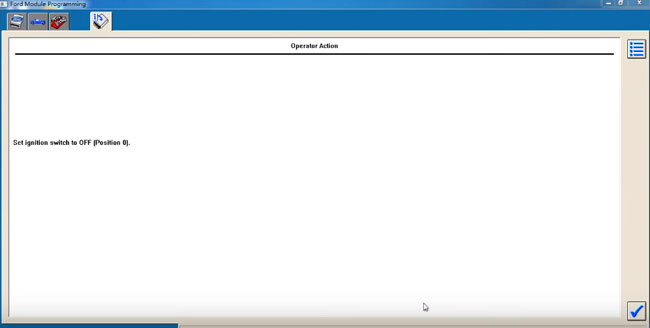
Set ignition switch to OFF
ignition-off
During the module programming, this module goes through a VIN verification process.
This process compares the VIN in this module with the VIN in other modules on the vehicle. You may see the VIN verification screen more than once depending upon your response to the question.
vin-verification
VIN is correct?
confirm-vin
Install a new module in vehicle
install-new-module
Do not start a reprogramming section with a low battery in the vehicle and/or programming tool.
The fuel pump and the engine cooling fans may run during the following procedure
If you are programming a 6.0L diesel, the FICM relay must be removed before programming
ficm-relay
Set ignition switch to ON
ignition-on
Erase procedure in process
erase-procedure
PCM reprogramming
pcm-reprogramming
Set ignition switch to OFF
ignition-off
in-progress
Set ignition switch to ON
switch-to-on
Set ignition switch to OFF
switch-off
Calibration has been loaded and checked
calibration-loaded
If you programmed 6.0L diesel, please reinstall the FICM relay
reinstall-ficm-relay
If required, obtain a PCM reprogramming label and complete as the screen displays
pcm-programming
Start engine
start-engine
Set ignition switch to OFF
switch-off
Set ignition switch to ON
switch-on
Clearing fault codes
clear-fault-code
Set ignition switch to OFF
switch-to-off
Run programmable module installation to correct the VIN
Note: the modules listed may not be installed on the vehicle. Verify that the modules are installed before performing diagnostics
programming-success
VXDIAG VCX NANO for Ford programmed the PCM module successfully.