Showing posts with label vxdiag vcx nano for ford. Show all posts

12/18/2023

How to Install VXDIAG Ford IDS V130 & Mazda IDS V131?

 Tutorial: How to install Ford IDS V130 and Mazda IDS V131 software driver on Windows 10 operating system.


Software can be downloaded free here

Free Download Ford IDS V130 Mazda IDS V131

Compatible devices:

VXDIAG VCX NANO Ford/Mazda USB or WiFiVCX SE or VCX Plus Ford/Mazda, VCM2 CloneVNCI MF J2534 Ford/Mazda

Operating system: Windows 10 (free to test on Win7 and Win11)

NOTE: Don’t install both Ford IDS and Mazda IDS on the same operating system!!!


How to Install Ford IDS V130?


Open Ford IDS V130 software folder

Install IDS_130.01_full.exe setup

install vxdiag ford ids v130 1

Select setup language
Install setup until completed
Reboot

install vxdiag ford ids v130 2

install vxdiag ford ids v130 3

Install VCI_Software_1.0.0.10 driver

install vxdiag ford ids v130 4

install vxdiag ford ids v130 5

install vxdiag ford ids v130 6

Install VX Manager 1.8.9

Install Passthru J2534 and Ford/Mazda IDS driver

install vxdiag ford ids v130 7

Copy and paste IDS_Patch to desktop
Connect VXDIAG device with laptop
Run VX Manager
check device status

install vxdiag ford ids v130 8

Run Ford IDS from IDS_Patch on deaktop
Software is ready to use

install vxdiag ford ids v130 9

install vxdiag ford ids v130 10


How to Install Mazda IDS V131?


Mazda IDS installation is easier than Ford IDS. Mazda does not need to install VCI software driver.

Open the Mazda IDS V131 software folder
Install MazdaIDS-131.00.exe setup.

install vxdiag mazda ids v131 1

Install setup until completed
Reboot

install vxdiag mazda ids v131 2

install vxdiag mazda ids v131 3

Install VX Manager

Install Passthru J2534 and Ford/Mazda IDS driver

install vxdiag mazda ids v131 4

install vxdiag mazda ids v131 5

Connect VXDIAG device with laptop
Run VX Manager
check device status

install vxdiag mazda ids v131 6

Copy and paste IDS_Patch to desktop
Run Mazda IDS from IDS_Patch on deaktop
Software is ready to use

install vxdiag mazda ids v131 7

install vxdiag mazda ids v131 8

www.obdii365.com

7/04/2022

Free Download V126 VXDIAG VCX NANO Ford IDS

 Both Ford and Mazda IDS V126 has been tested and verofiied working no issue on July 2022.


Software version:

Ford IDS V126.01

Mazda IDS V126.01


Operating system: Win7, Win8 and Win10

Attention: Mazda and ford ids must be installed on different operative systems. On the same computer but on different windows(dual boot) only. Or on different computers


Device affected: vxdiag vcx nano ford/mazda USB/WiFi version, VXDIAG VCX SE Pro, VXDIAG Full, Ford VCM2 clone using vx manager etc


Free download Ford IDS V126

https://mega.nz/folder/6dwzgaJR#XW2q1xPdbgKV4XtZQqkB0w

File including:

IDS-126.01_full.exe
VCI_Software_1.0.0.10.exe VX Driver
VX Manager 1.8.9.0601.exe

Free download Mazda IDS V126

https://mega.nz/folder/iQp1UACZ#d4ey2cWHmaEMf9n2dTcTAQ

File including:

IDS-126.01_full.exe
VX Manager 1.8.9.0601.exe

Free download Ford and Mazda IDS Patch

https://mega.nz/folder/OV4RRC6B#seCWP6UCzOPWEDYlQxZ1iQ

** INSTALLATION GUIDE WITH EASY STEPS INCLUDED **


Ford IDS native install languages: Chinese (traditional, simplified), Czech, Danish, Dutch, English, Finnish, French, German, Greek, Hungarian,

Italian, Japanese, Norwegian, Polish, Portuguese, Romanian, Russian, Slovenian, Spanish, Swedish, Thai, Turkish


Ford IDS Installation:

1. Install Ford IDS-1**
2. Wait for the installation of Ford IDS – 1**, and restart the computer
3. Install the Ford original VCI software_ 1.0.0.10.exe
4. Install VX manager and Ford IDS driver
5. Wait for VX manager and Ford IDS driver installation to complete
6. Connect VCX device and install idspatch
7. Use idspatch to open IDs and start diagnosis.


Mazda IDS Installation:

1. Install mazdaids-1**
2. Wait for mazdaids – 1** installation to complete and restart the computer
3. Install VX manager and Ford IDS driver
4. Wait for VX manager and Ford IDS driver installation to complete
5. Connect VCX device and install idspatch
6. Use idspatch to open IDs and start diagnosis.

2/18/2022

How to Use VXDIAG VCX NANO with ForScan, FJDS, FDRS?

 Vxdiag vcx nano for Ford/Mazda has been tested as a good j2534 passthru interface. VCX NANO works perfectly with IDS, ForScan, FJDS and FDRS as a J2534 pass-through device.

IDS (Ford Integrated Diagnostic System) allows dealership technicians to diagnose and service Ford, Lincoln, Mercury vehicles. As the new diagnostic tool, IDS will be required to perform diagnostics on future model year vehicles.

FJDS ( Ford J2534 Diagnostic Software) is the new version of Ford Module Programming, and the interface is clunky like IDS. FJDS does not have the same level of diagnostics as IDS but if you need to program modules, change some parameters, etc

FDRS (Ford Diagnostic & Repair System) is the official dealer diagnostic and repair software used by technicians at your dealership. It can test (run diagnostics) on various modules, update module software, load/reload as-built configurations etc.

ForScan is mostly used for module configuration (it cannot do module software updates).

  • Set up VXDIAG with Ford IDS
  • Set up VXDIAG with Ford ForScan
  • Set up VXDIAG with Ford FJDS/ FDRS

Set up VXDIAG VCX NANO with Ford IDS

The latest version IDS for VXDIAG goes to V124 (till Feb, 2022)

Free Download VXDIAG Ford IDS V124

https://mega.nz/folder/6dwzgaJR#XW2q1xPdbgKV4XtZQqkB0w

Including
FordIDS-124.01_full.exe
VCI_Software_1.0.0.10.exe
VCI Manager (Ford) 20.11.24.exe

Ford IDS V124 Installation Instruction 

1. Install IDS Software
2. Install VCI_Software_1.0.0.10
3. Install VCI Manager(Ford) 20.11.24

Install Ford IDS-124
Wait for the installation of Ford IDS – 124.01, and restart the computer
Install the Ford original VCI software_ 1.0.0.10.exe
Install VX manager and Ford IDS driver
Wait for VX manager and Ford VCI driver installation to complete
Connect VCX device and install idspatch
Use idspatch to open IDs and start diagnosis.


How to set up and install VXDIAG Ford IDS on Windows 10?


Set up VXDIAG VCX NANO with Ford ForScan

This is how to set FORScan to detect and work with Vxdiag Vcx Nano for Ford.

First of all install VX Manager and this passthru driver:

Set up VXDIAG VCX NANO with Ford ForScan 1

And second configure ForScan how this image:

Better run Forscan as administrator and select J2534 adapter as VXDIAG
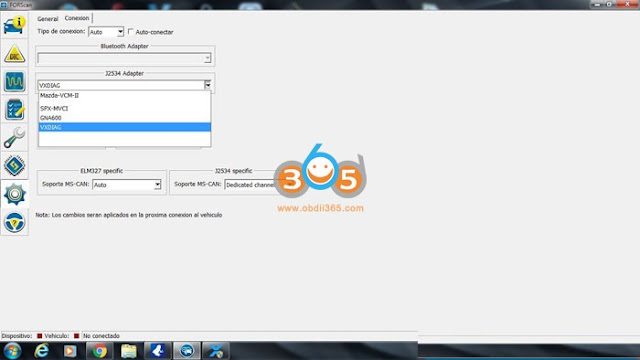
Set up VXDIAG VCX NANO with Ford ForScan 2
It’s run perfectly

Update the VCX manager and drivers to the latest version.


Set up VXDIAG VCX NANO with Ford FJDS/FDRS

Here is the procedure with FDRS. FJDS is very similar, just use different license. Make you you have the required FJDS license from Motorcraft.

Tools you will need:

– Windows PC with 4GB RAM or greater, running Windows 10 natively (Macs running Windows bootcamp or other VM based solutions are known to cause issues)
– VXDIAG VCX Nano Ford interface
– USB Flash drive 64GB or larger (must be formatted to exFAT)
– 12V Automotive Battery Charger/Maintainer (can be purchased from Amazon)

Software you will need:

– VX Manager (installs driver for your VXDIAG VCX Nano device)
– Ford Diagnostic & Repair Software (commonly known as FDRS)

Software installation (step-by-step):

1) Download the latest VX Manager installer from here
2) Start VX Manager installation, when prompted select PASSTHROUGH – J2534

Set up VXDIAG VCX NANO with Ford FDRS 1

DO NOT SELECT FORD/MAZDA – IDS. Using this IDS emulation can brick your ECU during the update process (learned the hard way)

3) Connect VCX Nano Ford device to your PC using the supplied USB cable and launch VX Manager. The tool should recognize the device. If there is a device firmware available, update the device firmware


Set up VXDIAG VCX NANO with Ford FDRS 2

4) Download and install FDRS software from here. You will need a license to run this software and can be purchased here (2-day FDRS license cost $50)
5) Launch FDRS, you will be prompted to enter the license that you have just purchased. Login using your credentials created on Motorcraft website. Make sure you select Non-Dealer Motorcraft as User Type

Set up VXDIAG VCX NANO with Ford FDRS 3

6) Connect your VXC Nano Scanner to your truck’s ODBII port and connect the USB cable to the PC running FDRS. Once FDRS Device Manager pops up, make sure you select Other Device, in the drop-down dialog select VXDIAG – J2534.
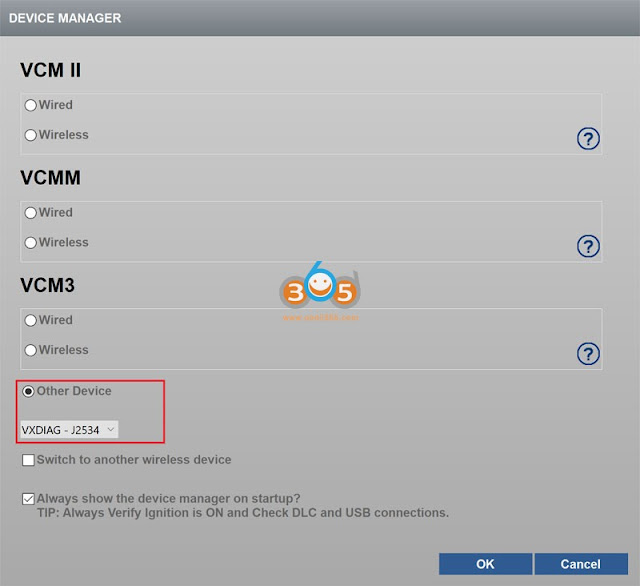
Set up VXDIAG VCX NANO with Ford FDRS 4

After this you should be greeted with this screen, meaning you are ready to go!

The icons at the bottom should be all green with battery voltage shown
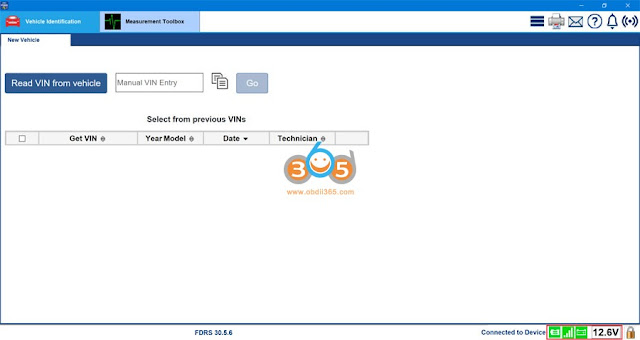
Set up VXDIAG VCX NANO with Ford FDRS 5

Running Network Test (Intial Scan)

1) Turn Ignition On, Engine Off
2) Click Read VIN from vehicle
3) Click Go to initiate Network Scan

Once completed a new tab called Toolbox will appear at the top of your FDRS screen:
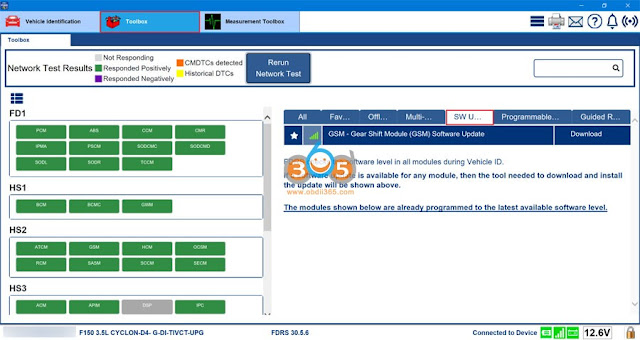
Set up VXDIAG VCX NANO with Ford FDRS 6


On the left hand side you will see all modules detected on your truck. The ones that responded positively will be marked green. On the right hand side notice the SW Updates tab. Head over here to see all available SW updates for your modules.

http://blog.obdii365.com/2022/02/18/set-up-vxdiag-vcx-nano-for-ford-ids-forscan-and-fdrs/#3

1/17/2022

Program Honda Civic ECU with VXDIAG VCX NANO as J2534 Passthru

 We are going to be testing out the vxdiag vcx nano ford as a J2534 passthru on a Honda Civic 2012.

Program Honda Civic ECU with VXDIAG VCX NANO 1

We got the Honda program (Honda J2534 Passthru ECU Reprogramming) up right now.

Program Honda Civic ECU with VXDIAG VCX NANO 2

Program Honda Civic ECU with VXDIAG VCX NANO 3

Program Honda Civic ECU with VXDIAG VCX NANO 4

and current program id available update system so as we can see there is a update on civic.

We'll press enter to start to control module update

Make sure everything goes good and right now it's programming now you got to remember that you do need a stable internet connection for update.

We are currently at thirty percent I'll hold this here it does take a little bit of time.

The update has been done i'll bring up the bulletin for it later.

I'm not actually connected to the internet because there is a database into the honda program that has specific ecu updates onto it so there was no need for me to actually go in and be online.
So right now as you can tell see all the information that's being transferred onto the password device.

Program Honda Civic ECU with VXDIAG VCX NANO 5

Program Honda Civic ECU with VXDIAG VCX NANO 6

Make sure that you are on a battery maintainer to make sure that the ecu has the proper amount of voltage and amperage going to it at all times because as the updates are being done.

it's cycling through different modules and different modules will be powering up powering down,  and you'll have a different amount of amperage.

that's going to be drawn onto the system so it's very important to always have a battery maintainer onto it.

Go ahead let this run through i'll do this in real time i'm not going to take digging fast forward at all.

I'm just showing you guys that it does actually work as a pass-through device.

So this update is actually going pretty quick.

I was expecting it to take a little bit longer than what it is

Program Honda Civic ECU with VXDIAG VCX NANO 7

Program Honda Civic ECU with VXDIAG VCX NANO 8

so turn the ignition switch to the off position which we'll do right now and don't need to switch the on within 60 seconds.

and here you can see the new calibration file that was into it.  So this was the previous, this one's the new one

Program Honda Civic ECU with VXDIAG VCX NANO 9

and program start number and model civic update description running change

So that's it for that you can print it or you can just exit it

Program Honda Civic ECU with VXDIAG VCX NANO 10

Program Honda Civic ECU with VXDIAG VCX NANO 11

so we'll go to System real quick and in the system search the vehicle does not need an update at this time.

so now we know that all the updates are done for this vehicle with the vxdiag vcx nano for Ford and Mazda IDS, but if you get the vcx nano gm or Toyota it will do the exact same thing.


If you were ever thinking of buying a programming device or a beginner entry-level diy at your house type of deal, then the vx nano will probably be your best bet as you can tell it does work now these programs are not free that i'm using you do actually have to pay for these programs to get them working.

www.obdii365.com

9/10/2021

Free Download Ford IDS V123 for VXDIAG VCM2 SVCI

 Newer version IDS V123.01 has been tested ok by obdii365.com engineer. Download software and patch here for free.

ford-ids

Software: 

Ford IDS V123.01

Mazda IDS V123


Multi-languages: English, German, French, Italian, Dutch, Spanish, Swedish, Finnish, Danish, Norwegian, Portuguese (European) , Portuguese (Brazil)

Operating system: Windows 7, Windows 8, Windows 10


For VXDIAG & VCM2

vxdiag-vcx-nano-ford

vcm2-clone

Compatible scanners:

VXDIAG VCX NANO USB/WiFi

Ford VCM2 clone using vxdiag solution

VXDIAG full brands incl. Ford


Free Download VXDIAG Ford IDS V123

https://mega.nz/folder/6dwzgaJR#XW2q1xPdbgKV4XtZQqkB0w

Including
FordIDS-123.01_full.exe
VCI_Software_1.0.0.10.exe
VCI Manager (Ford) 20.11.24.exe

Free Download VXDIAG Mazda IDS V123

https://mega.nz/folder/iQp1UACZ#d4ey2cWHmaEMf9n2dTcTAQ

Including
MazdaIDS-123.00.exe

VCI Manager (Mazda) 20.11.24.exe


Free download IDS patch 

https://mega.nz/folder/OV4RRC6B#seCWP6UCzOPWEDYlQxZ1iQ


Install Ford IDS V123

1. Install IDS Software
2. Install VCI_Software_1.0.0.10
3. Install VCI Manager(Ford) 20.11.24

4. Connect VCX device and install idspatch

5. Use idspatch to open IDs and start diagnosis.


Install Mazda IDS V123 

  1. Install mazdaids-123

2. Install VX manager and Ford IDS driver

3. Connect VCX device and install idspatch

4. Use idspatch to open IDs and start diagnosis.


Note:

1. Ford IDS requires VCI Manager driver, Mazda IDS does not.

2. Ford IDS and Mazda IDS need to be installed on separate systems.

3. Don’t install IDS on Home version windows system.


For STIC SVCI J2534

svci-j2534

Ford IDS V123

=> Setup: IDS-123.01_full

=> Driver: SVCI_J2534_Ford_Setup_v1.2.3.1

=> VCI: VCI_Software_1.0.1.16

=> Update:

=> Java 32 bit: Download


SVCI Mazda software has not been updated to V123 yet.  Contact us if you need V122 version.


SVCI J2534 is a specialized diagnostic device for Ford/Mazda. Support in-depth diagnostics and installation of vehicle control boxes. In addition, SVCI can also support Ford models until 2020 when using FDRS software.

1/10/2019

Download and Install VXDIAG Ford Mazda IDS V112 no VMware

Both Ford IDS v112 and Mazda IDS V112 have been tested working no issue with VXDIAG scanners.  Here you can download IDS v112 and patch with nactive installation (no virtual machine).

Software version: V112.01
Compatible device: VXDIAG VCX NANO for Ford/MazdaVXDIAG Multi tool for Ford/Mazda, VCM2 clone using VXDIAG solution
Operating system: Win7/Win8/Win10 (you can try yourself)
Language: English,German, French, Italian, Dutch,Spanish, Swedish, Finnish, Danish,Norwegian, Portuguese(European),Portuguese(Brazil)

Preparation:
Download IDS V112 & patch


Free Download VXDIAG Ford IDS V112
https://mega.nz/#F!EpoUnSgL!2my58LmoP1ljhKagIqEDTA

Free Download VXDIAG Mazda IDS V112
https://mega.nz/#F!AtgDTQpK!75YJKyupVlz4aJwCsjE7Rw

Free Download Ford & Mazda patch
https://mega.nz/#F!AooiHQrR!WsDPAmflZTrFsaKmLT7G8w


How to install Ford IDS V112/Mazda IDS V112 on native machine?
Step 1: Install IDS setup 
Install IDS-112.01_Full setup
install-vxdiag-ids-v112-1
install-vxdiag-ids-v112-2
Accept license agreement
Select destination folder
Click on Install
install-vxdiag-ids-v112-3
Install IDS 112.01 installshield wizard until completed
install-vxdiag-ids-v112-4
Restart computer after installing setup

Step 2: Install VX Manager 
Open VX Manager
Accept license agreement
Press Next
install-vxdiag-ids-v112-5

Installing VCX SDK Driver
install-vxdiag-ids-v112-6
This will also start VXDIAG Cloud Diagnostic Service
install-vxdiag-ids-v112-7
VX Manager installation completed
Connect the VXDIAG Ford interface with laptop
install-vxdiag-ids-v112-8
Open VX Manager to check connection status (If use VCX-DoIP interface, it will auto detect and connect to laptop)
install-vxdiag-ids-v112-9
Select Diagnostic Software: Ford IDS
install-vxdiag-ids-v112-10
install-vxdiag-ids-v112-11
Install Ford IDS driver

Step 3: Install Patch & Run IDS
install-vxdiag-ids-v112-12
Open IDS patch
install-vxdiag-ids-v112-13
Ford IDS requires teh following information: dealer type (Ford/Lincoln/Mercury),Dealer code (1111) and country
Press tick icon to continue
install-vxdiag-ids-v112-14
Auto starts IDS software and diagnose vehicle.
Done.