Showing posts with label jlr sdd. Show all posts

6/20/2017

Jaguar Land Rover SDD V145 cable, VXDIAG or Mangoose Pro?

Topic: 

what is the best clone Jaguar Land Rover diagnostic equipment for JLR SDD software v145?


Reviews of JLR diagnostic tools:

– I use Vxdiag Vcx Nano for JLR and new Jaguar sdd software download on the web. Easy to update myself.

– Mongoose Pro JLR works well, tested.

– Also Ford VCM2 should work with this software!

– I got a VXDIAG from China. It works great and it still has online support, device driver and firmware updates which is good.
– Works OK with 145 jlr sdd crack and I can now do things that the Mangoose PRO was flaky with.

– I have the Nano and as of yet have never got it work! I was hesitant about the DIAG or maybe choose the VCMII.

– Pretty much any J2534 will work offline with this software , Its the pin consignment and protocols held by a device that will limit it .

– the Mongoose Pro seems to work the best out of the clones with the jlr software.

– I bought VXDIAG in the end and it works PERFECT! I’ve program a new key ok.

– I am using JLR SDD 2. basic diagnostics works perfect with SDD v149 and program keys to Jaguar before 2008 also no issues


In short, Vxdiag Vcx Nano JLR and Mangoose pro cable are the popular tools for jaguar land rover diagnostic software.

Here are some tips of Vxdiag Vcx Nano JLR and Mangoose pro.

– Allscanner Vxdiag Vcx Nano for JLR jaguar land rover
wifi-vxdiag-vcx-nano-land-rover-jaguar-1
Price: $ 90 around

Confirmed to do diagnosis/ program keys/ECUs perfectly on Diesel & Gasoline cars (up to 2016/2017):

Land Rover car list: L316, L319, L320, L322, L359, L405,L494, L550, L538….
Jaguar car list: X100, X150, X152, X202, X250, X350, X351, X400….

  1. Data Lists……Worked
  2. Active Tests……Worked
  3. Monitor……Worked
  4. Utility tests……Worked
  5. Reprogramming……Worked
  6. Diagnostics (Trouble Codes)……Worked
  7. Program keys……Worked
  8. Program a module……Worked


– JLR Mangoose pro cable (china clone)
jlr-mangoose-pro-sp205
Price: $40 nearly

Confirmed to do basic diagnosis only on JLR cars up to 2016/2017:

Land Rover car list: L316, L319, L320, L322, L359, L405,L494, L550, L538….
Jaguar car list: X100, X150, X152, X202, X250, X350, X351, X400….

  1. Data Lists……Worked
  2. Active Tests……Worked
  3. Monitor……Worked
  4. Utility tests……Worked
  5. Reprogramming……Worked
  6. Diagnostics (Trouble Codes)……Worked


In summary, Vxdiag Vcx Nano or Mangoose pro, it depends. For key/ecu programming, you should go with Vxdiag Vcx Nano JLR. Otherwise, a cheap Mangoose pro should be ok. You will get what you pay for.

4/12/2017

VXDIAG Multi Tool for BMW JLR and VAG replace ICOM SDD and ODIS

The 2017 new released VXDIAG A3 is a new generation of universal automotive diagnostic scanner developed by Allscanner Technology Co., Ltd., supporting BMW, LAND ROVER & JAGUAR, VW. 


Top features of VXDIAG A3 Multi Tool:
1. Support BMW,LAND ROVER & JAGUAR, VW 4-in-1

2.Support the latest DOIP diagnosis (The protocol is used for vehicles produced after BMW F series, Land Rover and Porsche, Volkswagen new models)

3.Support USB and WIFI connection

4.Multi-language (check language info below)

5. Comes with latest software, ISTA-D v40.01.21, ISTA-P v3.59.4.004 and all engineering software INPA,WinKFP,Ncs expert etc, JLR SDD V148 and vag diagnostic tool ODIS 3.1.0
vxdiag-a3

1.VXDIAG A3 for BMW function introduction

The new BMW software can perform programming and coding for all BMW E/ F/ G series cars. Same as BMW ICOM A1 / A2 / A3, ALLSCANNER VXDIAG A3 supports all BMW software and is good at fiber programming.
 
The main diagnostic software includes: 
BMW software version: Diagnosis: ISTA-D v40.01.21, Programming: ISTA-P v3.59.4.004

BMW ISTA-D (Diagnostic);
BMW ISTA-P (Programming)
BMW Group ISPI (the fourth generation of BMW diagnostic software client);
E-SYS (Engineer Software for F series, available for programming, coding, Customization, realize hidden functions, advanced features);
WINKFP (for E series: programming, upgrade and downgrade);
Ediabas Tool32 (enter key, import codes, delete certification, advanced features of BMW series);
INPA (read vehicle information, diagnosis, read and clear trouble codes);
BMW Coding (for E series: import data, change the code or realize hidden functions);
KSD2 (offer full vehicle repairing information for diagnosis or programming);
NCS-Expert tool (for E series: set codes, realize hidden functions and change settings);

BMW software includes the engineer version, which is the quick and easy diagnostic programming and coding system that German BMW engineers are using. The system is designed in English and German. The Engineer version is so practical and powerful that it can achieve professional features which all the original professional computers can realize, can change the language into Chinese through the OBD port for import cars (Europe regulation cars, the United States and the United States, Africa, etc.). Features mainly include: diagnosis, programming (incl. programming one module only), coding, realize hidden function, new features activation, the module system update.


Following functions can be activated based on the existing configuration model:
01 use the button in the cab to close the trunk (electric tailgate), to terminate the reverse operation at any time (available in cars with the electric tailgate)
02 activate the Bluetooth phone function, to automatically play the music inside the phone every time you start the car. (Available in models with a USB port in the armrest box or gear)
03 support audio and video playback via USB cable as well as via iPod.
04 connect to the phone through the Wi-Fi (mobile phones are required to install software)
05 open the voice recognition function (currently only available in English digital telephone dialing)
06 operate the navigation menu when driving, watch DVD (Even the original car is available with CD, you can also watch DVD)
07 Active internet applications (available in post 2012.09 models with professional navigation, but some unsupported with unclear reasons)
08 immediately fold the rear-view mirror with the remote control (for the original car, owners need to press the lock key for 1.5 seconds)
09 activate gearbox program on the sport cars, at a quicker response for speeding up. But it will cause fault codes in ECU test in the 4S shop. (NOT recommended)
10 effectively prevent rear-end collision because brake lights flash quickly when braking severely (for 3 Series 5 Series, testing)
11 use mobile phone traffic to surf the Internet on iDrive via the phone Bluetooth (not tested yet)
12 adjust the warning speed of changing a lane (available in high-end cars with the rearview mirror with the dead angle warning indicator) (not tested yet)
13 automatically released the handbrake (parking button) when the vehicle is started (testing)
14 add the lane departure system and roadside warning identification function (available in optional cars with front cameras) (not tested yet)
15 L7 around Sound Pro

Personalized Customization
1. Set Seat Belt Alarm time (second/sec)
2. Disable passenger Seat Belt Alarm
3. Disable driver Seat Belt Alarm
4. Set the engine on/off status the same as that before the ignition off or the default status off.
5. Set the central lock automatically unlock when ignition off
6. Set Fuel Economy Mode as default mode after ignition on
7. Enable roll up window when open car door
8. Enable the option of DRL (Day Running Lights) on or off.
9. Set Highlight auxiliary and intersection traffic light “Automatic”
10. Enable to adjust DRL brightness (the default factory setting is brightest)
11. Set fog light turn on while headlight is on
12. Enable to Lock/Unlock sound and adjust the volume
13. Enable auto close sunroof when raining (May lead to initialize sunroof, it will work only after ignition on for 10 seconds, not very effective.)
14. Set windshield wiper Back in place when ignition off
15. Set sunroof automatically close in a tilted state (It needs to initialize sunroof)
16. Set the turn signal light on/off times (F30)
17. Enable CIC menu display CI version
18. Three Bluetooth phone rings available
19. Enlarge phone number and text storage (25 to 50)

A/C (Automatic Air Conditioning)
20. Set indoor internal circulation memory the same as that when the ignition off last time.
21. Set air conditioning memory the same as that when ignition off last time.
22. Display engine output power and torque on navigation screen
23. Cancel home screen boot delay confirm message
24. Cancel rear view camera statement when reversing
25. Display available gas station on navigation
26. Display speed limit info (Need hardware support)
27. Display engine torque menu
28. Auto headlight
29. TPMS
30. Display tire pressure and temperature (Need hardware support)
31. Adjust mile to kilometer
33. GPS time synchronization
34. Dashboard stimulate instant fuel consumption: change from 20 to 30
35. Enable dashboard light on always
36. Enable dashboard light always on at night (For BMW 535, GT, 7 series and part of BMW 530)
37. Enable dashboard light always on at daytime (For BMW 535, GT, 7 series and part of BMW 530)
38. Enable dashboard lights turn grey (For BMW 535, GT, 7 series and part of BMW 530)
39. Enable dashboard lights turn orange or grey (For BMW 535, GT, 7 series and part of BMW 530)
40. DS Mode display current shift from S1 to S7
41. Set Head-Up Display (Navigation map distance and turn signal, etc.) (Need hardware support)
42 PDC reversing radar is changed vertically and horizontally

2.Vxdiag A3 for LAND ROVER&JAGUAR features

The newest JLR IDS V148 can perform online programming, test, diagnosis and programming key with Incode, Chinese localization, etc.

For the 2014 Range Rover Executive Edition and new Range Rover Sports, since the communication protocol was changed, only ALLSCANNER VXDIAG A3 is verified to be able to diagnose. JLR Mangoose cable can’t cover any longer, if JLR Mangoose cable is plugged into the vehicle, all the dashboard warning lights will be on and lead to the vehicle malfunction; VCM can’t cover neither, although it can cover the newer Jaguar and Land Rover.

ALLSCANNER VXDIAG A3 JLR SDD language:
English / Japanese / Portuguese / Romanian / Korean / Dutch / Polish / Turkish / Spanish / French / Italian / Croatian / Danish / German / Swedish / Finnish / Slovenian / Czech / Russian / Greek / Chinese

Software functions: read live Data stream, actuation test, monitoring, utility testing, reprogramming, diagnostic trouble code.

Bus protocol:
1. J1850PWM / SCP
2. ISO9141 / KWP2000
3. ROSCO
4. Medium Speed CAN
5. CAN Bus (capable of ISO 15765, GMLAN, and ISO14229)


3. Vxdiag A3 for VW features

VW function introduction:
Support the newest ODIS 3.10 software and UDS protocol.
Support Volkswagen, Audi, Skoda, Bentley, Lamborghini

ODIS language available:
English/Japanese/Portuguese/Romanian/Korean/Dutch/Polish/Turkish/Spanish/French/Italian/Croatian/Danish/German/Swedish/Finnish/Slovenian/Czech/Russian/Greek/Chinese
System Requirements: Dual-core processor, better above I5; over 4G of memory

Vxdiag A3 Package list:

1pc x ALLSCANNER VXIDAG Main Unit
1pc x OBD cable
1pc x USB cable
1pc x network cable
1pc x 500GB hard drive

vxdiag-a3-package
vxdiag-a3-package-2


12/02/2016

VXDIAG VCX NANO for JLR SDD with 10inch Tablet

Allscanner company has newly developed VXDIAG VCX NANO for JLR Land Rover and Jaguar 2 in 1 WIFI auto diagnostic scan tool with 10inc tablet.

Top 6 advantages of VXDIAG VCX NANO JLR SDD

1. Replacement of OEM tool of SPX VCM and i-VIEW 

2. Support all protocols of Land rover and Jaguar 

3.Multi-languages:English/Japanese/Portuguese/Romanian/Korean/Dutch/Polish/Turkish/Spanish/French/Italian/Croatian/Danish/German/Swedish/Finnish/Slovenian /Czech/Russian/Greek/Chinese 

4. Supported Car Models: Diesel and gasoline cars 

5. Update by CD, without firmware locked 

6. WIFI Connection support. 

VXDIAG VCX NANO for Land Rover/Jaguar Vehicle List: 

Supports 2005 to 2014 year vehicles of Jag uar and Land Rover 
Supports L316, L319, L320, L322, L359, L405,L494, L550, L538 Land Rover Vehicle Lines 
Supports X100, X150, X152, X202, X250, X350, X351, X400 Jag uar Vehicle Lines 

Jaguar-Land Rover Features: 

1. Data Lists 
2. Active Tests 
3. Monitor 
4. Utility tests 
5. Reprogramming 
6. Diagnostics Trouble Codes

Chuwi Hi10 Tablet Configuration:
Chuwi Hi10 Tablet
CHUWI Hi10 adopts Intel's 2016 new-generation CPU, Intel X5 Cherry Trail Z8300 CPU, 1.84 GHz, stepping into the era of 14nm Comparing with the 22 nm for the last generation processor, it enhances the performance by 50%. Intel provides Hi10 with turbo boost, which combines function with performance.

Hi10 has 2 full size USB ports, including one advanced USB 3.0 high-speed port. so you can power your phone and use a portable Hard Drive
There also is a port for micro USB and HDMI, and our upgraded third-generation docking keyboard.


Hi10 comes with Windows 10 featuring the NEW Edge browser (with extensions and web notations) Cortana the Smart AI by Micorosoft, virtual desktop, and the new
Windows store for games, apps, music and movies. with Bluetooth you can get work done with mouse and keyboard, or play with the Xbox one controller.

The design for tablet and CHUWI rotating shaft keyboard is delicate. When you use the rotating shaft keyboard, Hi10 becomes the Ultrabook.
Some people will not be aware that it is a tablet. The unibody design makes the tablet combo successful.


JLR SDD software on Chuwi  Hi10 Tablet:
jlr-sdd-on-chuwi-tablet-1

jlr-sdd-on-chuwi-tablet-2

10/14/2016

How to install VXDIAG VCX NANO JLR SDD V145 on Win7

VXDIAG VCX NANO Jaguar and Land rover diagnostic software has newly updated to V145 offline programming version.


Software version: V145
Operating system: Windows 7 32-bit

Compatible device: VXDIAG VCX NANO for JLR WiFi/USB interface

Free download JLR SDD V145 software & patch
Note:
JLR SDD V145 installation warning:
1. After install SDD software successfully, connect computer to network and then install patch(the patch is key to activate offline account. Do not forget to install the patch!)
2.After activate software, disable network connection!!!
3.If SDD runs ok, install freeze DFStd software.
If you did not install the freeze software within one day, software will expire within one day.Solution is to reboot the computer, enter the computer BIOS settings, reset the computer date/time to the date before the trial period.
Take Dell D630 laptop as an example, press “Power” button then F2 button, to enter BIOS-Date/Time,reset the data time.
4.JLR SDD V145 is offline trail version. If you connect to network after software activation, you do not have the one-day trial.
JLR SDD V145 1

JLR SDD V145 2

JLR SDD V145

How to install VXDIAG VCX NANO JLR SDD Part I
(Video for VXDIAG VCX NANO for Jaguar and Land rover USB/Wifi inetrface)
How to install VXDIAG VCX NANO JLR SDD Part II

10/13/2016

How to set up VXDIAG VCX NANO Cloud Diagnosis

VXDIAG VCX NANO series scanners (Ford/Mazda IDS, GM/Opel GDS2,JLR SDD,VAG ODIS,Toyota Techstream) has developed "Cloud Diagnosis" function without installing software.


What is Cloud Diagnosis?
-That means you do not need to install the software, you just need to install the VX Manger, then you can start to do the diagnosis!


Operating system:

Recommended using Microsoft WIN7 or higher system. Computers are required to

install the Microsoft IE11 or Google browser. Android and IOS systems are not supported


How to set up VXIDAG Cloud Diagnosis?


1.Installation of VXDIAG device driver management“VX MANAGER";


Accept license agreement


Here nothing to choose, directly click on "NEXT" go down:


2.Connected to the VXDIAG diagnostic equipment, the computer automatically install the driver;


3.The driver installed after open the "VX MANAGER", select the top menu VX CLOUD";


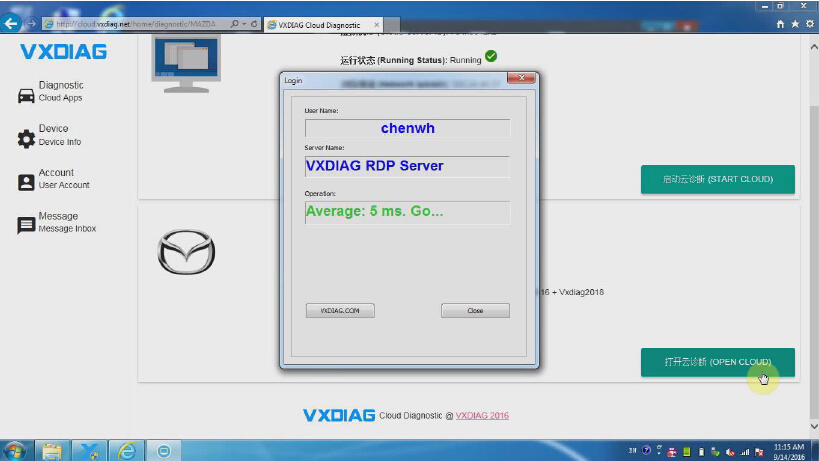
Click and open "start cloud diagnostics” will automatically open the default browser, enter the cloud diagnostics enter the dealer to the account and password;


4.Select the required models in the main interface Icon;


Select "Open Cloud diagnostics" and enter the cloud server(Note: to enter the cloud server must be connected to the device);


Here we take VXDIAG VCX NANO Mazda IDS software as an example


5.Open diagnostic software for vehicle diagnosis


How to use VXDIAG VCX NANO Cloud Diagnosis function? 
https://youtu.be/d1aT_E6pTyM 

6/12/2016

Free download SDD V145 Offline for VXDIAG VCX NANO for JLR

VXDIAG VCX NANO for Jaguar and Land Rover 2 in 1 SDD diagnostic software update to V145 engineering software support offline programming.
VXDIAG-VCX-NANO-FOR-JLR
Free download VXDIAG JLR SDD V145 Offline Engineering software

Software version: SDD V145
Multi language:English/Japanese/Portuguese/Romanian/Korean/Dutch/Polish/Turkish/Spanish/French/Italian/Croatian/Danish/German/Swedish/Finnish/Slovenian/Czech/Russian/Greek/Chinese
Supported Car Models: Diesel and gasoline cars
Update by CD, without firmware locked

Computer requirement:
Windows 7 32-bit opearating system
Processor I3 I5
RAM at least 1G
Hard drive over 200G (SSD is better)

VXDIAG VCX NANO for JLR Vehicle List:
Support 2005 to 2014 year vehicles of Jaguar and Land Rover
Support L316, L319, L320, L322, L359, L405,L494, L550, L538 Land Rover Vehicle Lines
Support X100, X150, X152, X202, X250, X350, X351, X400 Jaguar Vehicle Lines

Jaguar-Land Rover JLR SDD Features: 
1. Data Lists
2. Active Tests
3. Monitor
4. Utility tests
5. Reprogramming
6. Diagnostics Trouble Codes

1/07/2016

VXDIAG VCX NANO for Jaguar and Land rover FAQ

Frequent asked questions of VXDIAG VCX NANO for Jaguar and Land rover SDD diagnostic interface are gathered below.

VXDIAG VCX NANO for Land Rover and Jaguar Software V141
Q: What’s the difference among VXDIAG VCX NANO for JLRJLR Mangoose SDD and VCM2 IDS/SDD for JLR
A:
1) Software is the same, differs in version, perform same functions
2) Differ in hardware and use different drivers
3) The biggest advantage of VXDIAG VCX NANO is the firmware will never be locked (unlike VCM2 SDD for JLR).

Q:  I have followed the installation instructions but SDD will not start, any ideas?? Installed on Win 7 Pro 32bit, have the vx manager driver installed, no error reports and no error screenshots. Install was OK, everything works right up to opening sdd, then nothing?
A: Your VXDIAG VCX NANO interface is not plugged into vehicle.  The hardware interface should be plugged into vehicle’s diagnostic socket if you need to run the SDD software.

Q:  I tried to use V142 with VXDIAG VCX Nano JLR on Win 8.1, the program start and i found the unit but it can’t read auto identification,or manual VIN number but it don’t work do the unit only work with V141, why?
A: The VXDIAG VCX NANO for JLR is compatible with V141 SDD software (compatible original SDD software V141 as well). V142 is too new to read the VIN. And please change another laptop running Windows 7 operating system.

Q: What’s the latest version SDD of the VXDIAG tool?
A: The current version SDD is V141.

Q: Does the VXDIAG SDD for JLR support diesel models?
A: Yes, it supports both diesel and petrol models.


Q: Will the new VXDIAG SDD support both online and offline programming? Need I pay extra payment?
A: The new SDD will do reprogramming (Immobilizer programming online requiresJaguar account. Other programming do no need to do online, but you need connect storage battery to make sure your voltage is stable)

Q: How to install the SDD software? Do you have instructions?
A: Software CD contain installation guide. And here is a Youtube software installation guide:https://www.youtube.com/watch?v=-NVVy_Ua7xY

Q: What year does the new SDD cover? Will it do Jaguar 2015?
A: The SDD supports 2005 to 2014 Jaguar and Land rover models.

Q: I have watched and installed as per vide, this allows offline mode to work for one day then it does not work?
A: For all the JLR software after V137, they can’t support offline programming anymore, only online programming.

Q: Does it support Dutch language?
A: Yes, the VXDIAG SDD supports multi language, includingEnglish/Japanese/Portuguese/Romanian/Korean/Dutch/Polish/Turkish/Spanish/French/Italian/Croatian/Danish/German/Swedish/Finnish/Slovenian/Czech/Russian/Greek/Chinese.

Q: How can I update it?
A: VXDIAG SDD software can be updated online. Firmware cannot be updated. 

12/15/2015

VXDIAG VCX NANO for JLR SDD clear DTC steps

In the following parts, I would like to show to clear DTC for Jaguar or LandRover with SDD running at VXDIAG scanner.

Tool to use:
VXDIAG for Jaguar Land Rover running SDD V141 from obd365, it is on sale now:
http://www.obdii365.com/wholesale/vxdiag-vcx-nano-for-land-rover-and-jaguar.html

Operation System: windows XP system
Function to operate: clear DTC for Jaguar LandRover with SDD running at VXDIAG

Step-by-step instruction:
Step 1: Launch JLR SDD, then click “SDD” to Login.
clear DTC for Jaguar LandRover with SDD running at VXDIAG
Step 2: After you see “The SPX – I – VIEW is connected” at the right corner, click “Continue”
clear DTC for Jaguar LandRover with SDD running at VXDIAG
Step 3:  Click “Auto VIN Read”.
clear DTC for Jaguar LandRover with SDD running at VXDIAG clear DTC for Jaguar LandRover with SDD running at VXDIAG
Step 4: Click “Diagnose”
clear DTC for Jaguar LandRover with SDD running at VXDIAG
Step 5:  Select symptom, SDD covers Chassis, power train, electrical and body, here I select Powertrain – Engine system – Engine cooling, then click “Continue” to identify recommendations for selected symptoms.
clear DTC for Jaguar LandRover with SDD running at VXDIAG
Step 6: After complete identifying recommendations for selected symptoms, click “Diagnose”.
clear DTC for Jaguar LandRover with SDD running at VXDIAG
Step 7: Click “Diagnose”, select Powertrain – Engine system – Engine cooling, then click “Continue” to load recommended candidates.
clear DTC for Jaguar LandRover with SDD running at VXDIAG
Step 8: select market specification, click “Save”, then go to analysing data…
clear DTC for Jaguar LandRover with SDD running at VXDIAG clear DTC for Jaguar LandRover with SDD running at VXDIAG
Step 9: Find out “Complete Vehicle – Clear all stored diagnostic trouble codes.”, click “Run”
clear DTC for Jaguar LandRover with SDD running at VXDIAG
Step 10: get message prompting “Ignition On Check”, click “Continue”
clear DTC for Jaguar LandRover with SDD running at VXDIAG
Step 11: Clearing DTC.
clear DTC for Jaguar LandRover with SDD running at VXDIAG
Step 12: Get operation tips, click “continue”
clear DTC for Jaguar LandRover with SDD running at VXDIAG
Step 13: back to the menu, and select “Session”, click the “refesh” Icon
clear DTC for Jaguar LandRover with SDD running at VXDIAG clear DTC for Jaguar LandRover with SDD running at VXDIAG
Step 14: Click “DTCs” to view DTCs read from vehicle.
Done
Hope it helps.