Showing posts with label ford vcm2. Show all posts

9/10/2021

Free Download Ford IDS V123 for VXDIAG VCM2 SVCI

 Newer version IDS V123.01 has been tested ok by obdii365.com engineer. Download software and patch here for free.

ford-ids

Software: 

Ford IDS V123.01

Mazda IDS V123


Multi-languages: English, German, French, Italian, Dutch, Spanish, Swedish, Finnish, Danish, Norwegian, Portuguese (European) , Portuguese (Brazil)

Operating system: Windows 7, Windows 8, Windows 10


For VXDIAG & VCM2

vxdiag-vcx-nano-ford

vcm2-clone

Compatible scanners:

VXDIAG VCX NANO USB/WiFi

Ford VCM2 clone using vxdiag solution

VXDIAG full brands incl. Ford


Free Download VXDIAG Ford IDS V123

https://mega.nz/folder/6dwzgaJR#XW2q1xPdbgKV4XtZQqkB0w

Including
FordIDS-123.01_full.exe
VCI_Software_1.0.0.10.exe
VCI Manager (Ford) 20.11.24.exe

Free Download VXDIAG Mazda IDS V123

https://mega.nz/folder/iQp1UACZ#d4ey2cWHmaEMf9n2dTcTAQ

Including
MazdaIDS-123.00.exe

VCI Manager (Mazda) 20.11.24.exe


Free download IDS patch 

https://mega.nz/folder/OV4RRC6B#seCWP6UCzOPWEDYlQxZ1iQ


Install Ford IDS V123

1. Install IDS Software
2. Install VCI_Software_1.0.0.10
3. Install VCI Manager(Ford) 20.11.24

4. Connect VCX device and install idspatch

5. Use idspatch to open IDs and start diagnosis.


Install Mazda IDS V123 

  1. Install mazdaids-123

2. Install VX manager and Ford IDS driver

3. Connect VCX device and install idspatch

4. Use idspatch to open IDs and start diagnosis.


Note:

1. Ford IDS requires VCI Manager driver, Mazda IDS does not.

2. Ford IDS and Mazda IDS need to be installed on separate systems.

3. Don’t install IDS on Home version windows system.


For STIC SVCI J2534

svci-j2534

Ford IDS V123

=> Setup: IDS-123.01_full

=> Driver: SVCI_J2534_Ford_Setup_v1.2.3.1

=> VCI: VCI_Software_1.0.1.16

=> Update:

=> Java 32 bit: Download


SVCI Mazda software has not been updated to V123 yet.  Contact us if you need V122 version.


SVCI J2534 is a specialized diagnostic device for Ford/Mazda. Support in-depth diagnostics and installation of vehicle control boxes. In addition, SVCI can also support Ford models until 2020 when using FDRS software.

4/02/2018

Ford IDS 109.01 Reviews and FAQs

(03-04-2018) Download FORD VCM IDS 109.01+(Online+Offline) Calibration Native Install with Remote Support.

Ford IDS V109 link:
ford-ids-v109-1
PC requirement:
WINDOWS VISTA, WINDOWS 7, WINDOWS 8, WINDOWS 10

A 64 bit operating system is required. Virtualization also needs to be enabled on your computer / laptop, most modern systems come with this enabled, if you need to enable it, this can be done through the systems BIOS.

Features:
native installation
you can use it unlimited time
installation and activation service for FREE via obdii365.com
support online programming function also included calibration file
also included incode calculator for key programming or module installation
works on all vcm1-vcm2-vcmx nano original or clone…….

Functions:
* Automatic vehicle recognition
* Read & Clear Diagnostic Trouble Codes (DTCs)
* Live Data-stream with Recording & Playback Functions for Main ECUs
* Guided Fault Finding
* New Software Re-flash for Existing ECUs
* Programming & Installation of new ECUs (PCM, ABS, Instrument Cluster, Air Bag, Fuel Pumps, etc.)
* Program New Keys (for additional fee)
* Injector Coding
* Set, Adjust or Remove Speed Governors
* DPF Regeneration
* Brake Bleeding
* Steering Angle Resets
* All Other Offline and online Dealer Functions

Compatibility:
Supports VXDIAG VCX NANO Ford, VCM 1 and VCM 2 (ORIGINAL & CLONE).

Ford IDS 109 Review:
Confirmed!
109 start and work, VCM1 clone (but oldest one), Windows 7
Installation from clear Windows start, and for end
friendly, responsive, fast

make a great install to me on win 7. all I had to do is drink coffee during install. works perfect no limitation

Trusted seller. Installed and activated without problems. V109 + incode calculator. Windows 7 64bit and VCM1 original. Very happy.

Online programming work %100


Ford IDS 109 FAQs:

It VCM 1 is compatible?
Yes, it can work with Ford VCM 1 clone

Works good with VCM2 clone?
I have Chinese clone VCM2 SP177-C1 and it works great with impressive speed. I would definitely recommend this guy.

Hi how about Online ? It will be work with cloned VCMII ?
can do online , work with original and clone VCMs

So just to confirm the testman.exe and other DLLs in the Runtime folder are all v109? I’ve found that many other hacked versions are build using v106 and not all features work with 2017+ vehicles. 
i know , some softwares can not work with 2017 cars , i know what to do for supporting 2017 cars .
i will change some files for it .

What is the price??? and where to?
$79.99 with free shipping, installation & activation service

Someone please test 2017 f150 key programming north america model
For F150 2017 need minimum IDS and NASTF account !!!

I have a vmware version of IDS 108.07, that appears to be built on 106 based on the file versions of a lot of the DLLs in the Runtime folder. Using a genuine VCM II with the 2.4.73.49 firmware, I canNOT do TCM module programming on a 2017. 
Never tried TCM on 2017+ but that’s a possibility.
All hack I’ve seen are based on v86, v101 or v106.
Never seen a hack based on v109 executables and DLLs .. that’s why I’m asking but he won’t answer that question.

What vcm2 firmware are you using ??
My point is.. all “good” clone can upgrade firmware to 2.4.73.49 no problem.
On newer vehicle’s BCM replacement, the procedure requires to get configuration restored ( looks like JLR process ). After you done PMI of the said BCM you must complete that configuration restore or the BCM installation won’t be completed and so DTC will show up and/or the bcm won’t work correctly. I’m not talking about PATS functions which do need a dealer login or other tools to complete.
Once again my point is you do require firmware 2.4.73.49 for this procedure on most newer cars like 2015 + focus or escape and probably other model too. Running this procedure with 2.3.85.7 or older firmware will show error in the process.
Now that being said, if your software allow the use of 2.4.73.49 firmware, and has the v109 testman.exe and other executable files, then it should be working. But if you are using v86 testman.exe and other executable files and DLL with odler firmware, I strongly recommend not trying to install BCMs on newer car. And so other functionality might not work too.

Here is a bcm replacement failed with firmware 2.3.85.7 and IDS 107. Same I’d happening with v108 and v109. You do require newer firmware.
ford-ids-109-software-review

1/29/2018

How to install Ford IDS V108 Software Step by Step

Latest Ford IDS V108.01 Full Software for Ford VCM II support online programming released on Jan. 2018.

Software Version: 108.01. No need activation
ford-ids-v108
Operating system: Windows XP/Windows 7 32/64 bit
Multi-language:
ford-ids-v108-language
Tested with Ford VCM2 clone and VXDIAG VCX NANO Ford: Never failed!!


Online programming: Supported! but you should have an account yourself.

Ford IDS v108.01 function: Confirmed!
1.Able to download the very latest calibration files/software from Ford server if the network connection available at the time of connecting to vehicles
2.Read and decode fault codes
3.Delete fault codes
4.Display System current parameters in digital form
5.Combined displaying of data
6.Logs Keeping: write and keep of digital parameters in memory
7.Special functions: changing of permissible seeting of blocks, programming etc.

FAQ:
Q: Whether it can work with Ford VCM 1 Clone?
A: Yes, it can work with Ford VCM 1 clone

Q: Is this vmware or native
A: This is native, install on new and clean windows xp/7

How to install Ford IDS V108 step by step?
Preparation:
1. Please backup the important files on the desktop and disk C because the next operation will cover the content in the disk C.
2.Disable both local area and wireless network connection
3. If your computer hard drive only has one partition, please prepare a 16 GB U flash drive, if has 2 partitions, please unzip the software of CD into another partition except disk C

Step 1: Recover System
Open Software D (Disk D)
install-ford-ids-v108-1

Create new folder Ford 108
install-ford-ids-v108-2

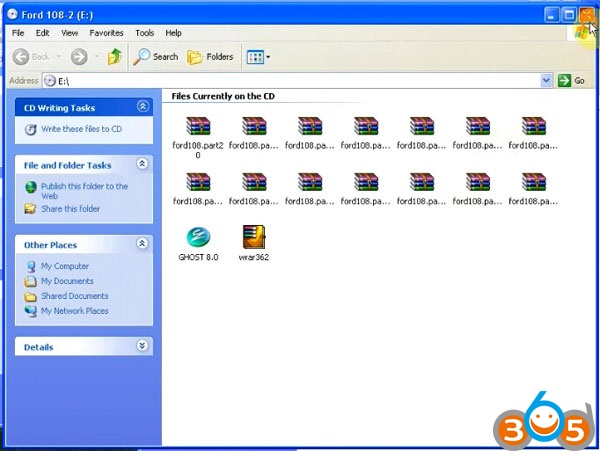
Copy all zip file on Ford 108-2 software CD to Ford 108 folder
Eject Ford 108-2 DVD-ROM to DVD/CD-RW Drive
install-ford-ids-v108-3

Copy all contents to Ford 108 folder again
Extract ford108.part01 zip files to Ford 108 folder
install-ford-ids-v108-4

Then delete all other zip files, ford108.part01-ford108.part33
(only 3 files left)
Open Ghost 8.0
install-ford-ids-v108-5

Recover system, choose destination D:/Ford 108/ford108.GHD
Restart computer and recover system
install-ford-ids-v108-6
Step 2: Install Ford IDS 108 Setup
install-ford-ids-v108-7
Run Ford Module Programming Limit as Administrator
Ford Extension Success, press OK
Module programming has been extended to 2018/05.26
install-ford-ids-v108-8

Click on Start menu->All Program->Bosch->VCM Manager (Ford-VCM-II)
If system prompt PC software initialization error, press OK to ignore
Open Disk C/Progam Files/Ford Motor Company->IDS->Runtime->install3rdparty->
ETAS, Run setup as Administrator
install-ford-ids-v108-9
install-ford-ids-v108-10
Install Bosch VCI software Ford VCM II
install-ford-ids-v108-11

click Next
Select Remove Bosch VIC software from your computer, click Next
install-ford-ids-v108-12

Press Remove
Click Finish
Again run setup as Administrator
click Next
install-ford-ids-v108-13

Ready to install the program
Click Finish
Install setup completed.

Step 3: Make Connection 
Click Start menu->VCI Manger (Ford-VCM-II)
install-ford-ids-v108-14

Connect VCMII with computer follow the diagram below
install-ford-ids-v108-15

Open Computer->Manager->Device Manger->Network adapters->ETAS VCI USB RNDIS Device
to check connection is built
install-ford-ids-v108-16
Open Network and Sharing center->Change adapter settings
Make sure you have disable both local area and wireless network connection
install-ford-ids-v108-17
Step 4: Run software
Open Ford IDS v108 software on desktop
install-ford-ids-v108-18
Network test, gathering vehicle data
install-ford-ids-v108-19

check language options, programming modules and options
install-ford-ids-v108-20
install-ford-ids-v108-21
Done.
http://www.obdii365.com/service/how-to-install-ford-ids-v108-software-96057.html

5/31/2017

VXDIAG Ford IDS Program Ford Focus 2008 PCM Step by Step

This how-to guide is aimed to help Ford PCM power-train control module programming with a VXDIAG VCX NANO for Ford– a redesign of the Ford VCM2 unit.

If you change the new original ECU, then can directly to program. If you want to use used ECU to change the broken ECU, first use this software to work on the car with broken ECU, then choose the option, see the prompt then change the used ECU for programming.

Need 14v when you do programming!!
Put battery charger on battery and retry.


This is a new Focus PCM to be programmed by Ford IDS.

Vehicle specification:
Focus 2008
DURATEC-HE/I4
ford-info
Module programming
module-programming
Programmable module installation: PCM
pcm-programming
Module programming notice:
You are about to program a procedure using the module programming application you purchased. The reason for this module programming may pertain to a Field Service Action that has been recommended by the manufacturer for the customer’s vehicle. In many instances, such services are provided free of charge to the customer when that service is provided by the manufacturer’s dealer. As part of the terms and conditions of your use of this application, you are obligated to inform the customer of this fact. Prior to performing any service on their vehicle, you must allow them the opportunity ti check with their local dealer to determine if their vehicle is in fact eligible for the repair free of charge. The manufacturer will not reimburse a customer for such services if not performed by a dealer
vehicle-info
Establish an internet connection
internet-connection
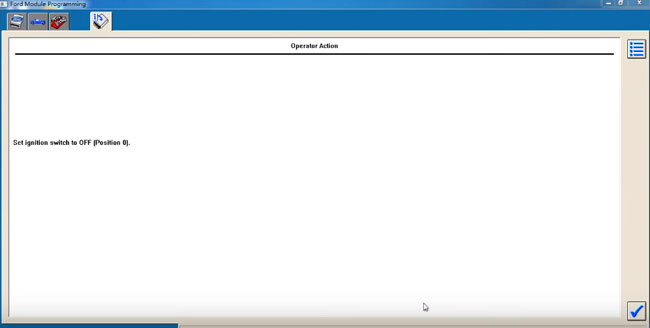
Set ignition switch to OFF
ignition-off
During the module programming, this module goes through a VIN verification process.
This process compares the VIN in this module with the VIN in other modules on the vehicle. You may see the VIN verification screen more than once depending upon your response to the question.
vin-verification
VIN is correct?
confirm-vin
Install a new module in vehicle
install-new-module
Do not start a reprogramming section with a low battery in the vehicle and/or programming tool.
The fuel pump and the engine cooling fans may run during the following procedure
If you are programming a 6.0L diesel, the FICM relay must be removed before programming
ficm-relay
Set ignition switch to ON
ignition-on
Erase procedure in process
erase-procedure
PCM reprogramming
pcm-reprogramming
Set ignition switch to OFF
ignition-off
in-progress
Set ignition switch to ON
switch-to-on
Set ignition switch to OFF
switch-off
Calibration has been loaded and checked
calibration-loaded
If you programmed 6.0L diesel, please reinstall the FICM relay
reinstall-ficm-relay
If required, obtain a PCM reprogramming label and complete as the screen displays
pcm-programming
Start engine
start-engine
Set ignition switch to OFF
switch-off
Set ignition switch to ON
switch-on
Clearing fault codes
clear-fault-code
Set ignition switch to OFF
switch-to-off
Run programmable module installation to correct the VIN
Note: the modules listed may not be installed on the vehicle. Verify that the modules are installed before performing diagnostics
programming-success
VXDIAG VCX NANO for Ford programmed the PCM module successfully.