Showing posts with label vas 5054a. Show all posts

12/18/2018

ODIS Service 5.0.3 Windows 7 Installation Tutorial

Here’s the how-to’s of ODIS service 5.0.3 Windows 7 installation.

First free download odis 5.0.3

Second, learn how to install odis 5.0.3 on Windows 7

Exract all postsetup files
Run “OffboardDiagSetup-Service_VWMCD_5_0_3-B50_3_2_6”
install-odis-503-software-1
“Next” until license file order.
install-odis-503-software-2
Search License file in recently extract file, click License.dat
install-odis-503-software-3
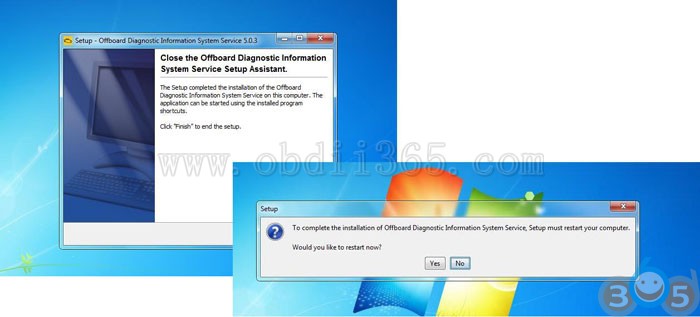
Finish to crack file
install-odis-503-software-4
Finish to crack file, Yes to restart
install-odis-503-software-5
Copy OffboardDiagLauncher in Launcher folder then Replace it in setup file
install-odis-503-software-6
Copy OffboardDiagLauncher in Launcher folder then Replace it in setup file
install-odis-503-software-7
Launch ODIS to set postsetup
install-odis-503-software-8
Launch ODIS service to set postsetup

IMPORTANT: ODIS 5.0.3 is the new version released in Oct. 20118, not tested yet by professionals, even though folks in forums says it has no issues of download and Windows 7 installation. You have to try 5.0.3 at your own risk.

For sake of safety, ODIS 4.4.1 is your way to go, especially for personal users:
4.4.10 is the latest tested version.
Confirmed to work with VAS5054A and VXDIAG VCX NANO VW 5054
odis-4410-software-1

odis-4410-software-2

odis-4410-software-3

odis-4410-software-4

odis-4410-software-5

odis-4410-software-6

odis-4410-software-7

odis-4410-software-8

odis-4410-software-9

odis-4410-software-10

http://blog.obdii365.com/2018/12/19/install-odis-5-0-3-on-windows-7/

8/19/2018

Free Download ODIS 4.4.10 and Installation

(20-08-2018) Free download the latest Odis service 4.4.10 full and postsetup and questions & answers that are frequently asked… also, you’ll get ideas of how to install ODIS 4.4.10 software to work with the  Bluetooth vas 5054a head.

Reliable link:
Odis service 4.4.10 below all is not tested by real professionals.
But you have luck with another tested version: odis 4.3.3
odis-4-3-3
Confirmed to work with vas 5054a clone and vxdiag vcx nano 5054
(vas5054a is able to do flashing, and works with odis engineering – vxdiag cannot work… but vxdiag firmware can be updated while 5054a cannot….)


Free links:

YOU ARE TRYING ALL FREE LINKS HERE ON YOUR OWN RISK!
NO ONE WILL HOLD RESPONSIBILITIES OF WHAT YOU’LL DO.
DON’T ASK HERE FOR PASSWORD.

Option 1 – full odis 4.4.10 download links from Guss: (NO need password)
It’s full ODIS-S 4.4.10 – No need for any key and it’s full with full language pack
(Audi, VW Passenger and Commercial, Skoda, Seat, Bentley, Lamborghini, Bughatti , Man Trucks)
Please use Winrar 5.50 so you can extract the files without any errors Wink

odis-service-4-4-10-1
odis-service-4-4-10-2
odis-service-4-4-10-3
odis-service-4-4-10-4
odis-service-4-4-10-5
Launcher + License:
Password for mega links: Guss_Gekoonline

Note that, if links here are dead, please go to https://cartechnology.co.uk/showthread.php?tid=38356

Credits to Guss from cartechnology.co.uk


Option 2 – odis 4.4.10 link from pilic: (Password required)
odis-service-4-4-10-download

Odis 4.4.10 Windows 7 installation tips:
  1. Install Odis only WIN 7 32 or WIN 7 64! ! ! ! Do not restart at the end ! ! !2. Copy +Paste OffboardDiagLauncher.exe to “Program Files (X86) > Offboard_Diagnostic_Information_System”
    3 .Copy “de.volkswagen.odis.vaudas.launcher_4.44.1.jar “ to “Program Files (X86) > Offboard_Diagnostic_Information_System\plugins”
    4. For Win 7 32 . Extract “Odis 4.4.10 Program x86.rar “ to ! ! ! “PROGRAM FILES (X86)” ! ! !
    5. For Win 7 64 . Extract “Odis 4.4.10 Program x86.rar “ to ! ! ! “PROGRAM FILES (X86)” ! ! ! AND Extract “Odis 4.4.10 Prgram Files.rar “ to ProgramData
    6. RESTART
    7. Do not start Odis
    8. Start > Edic Conf. Manager with USB and with Bluetooth
    9. Is detected 5054 start odis
    Enjoy!

Credits to pilic from mhhauto


Option 3 – odis v4.4.10 software download link 3

It’s ODIS v4.4.10 Audi, Seat, Skoda, Volkswagen, VW Commercial  Language: PL, EN, DE      Download:
Password:TotalfrEE__Best_regards!


How to install Odis 4.4.10 setup, license, postsetup:
Step 1: Install Setup + license and reboot
Step 2: Do not run ODIS and replace files ( Launcher )
Step 3: Run Odis and install PostSetup


FAQs: Tips help install Odis 4.4.10 setup, license, postsetup

Q: Can we use the clone VAS5054 ?, as it was done in the previous version ?
A: It should work as the previous version
The pdu api package not changed on 4.4.10 is same as before………….

Q: Will this will be ok to use with vas 5054a head ?
A: Yes it works

Q: 1st Erwin not working, but all other working good. Thx
A: It’s working! but your internet provider or ur country block FTP ! it’s not a link issue !

Q: I do not recognize the VAS, I have already commented and tested the theme of passthru driver, but, I do not achieve it, I do not know what I will be doing wrong, I tried to copy the old folder softing, but neither, that I could be doing wrong ?
A: Your issue is either your VAS is very old or ur PDU

Q: well a fresh instalation of 4.4.10 all went ok 
connect the vas 5054a to the laptopthrough usb and connect it to the car
start the odis………the vas is not recognized……and further?
A: Install another EDIC_D_PDU_API.


Odis 4.4.10 Review:
I’ve managed to make it work. I have restored the laptop, and I have installed everything from scratch again, but this time, when uninstalling version 4.3.3, when the window to choose what you want to uninstall (license, data, etc …), I have not selected any , and I have kept the directory, and after installing the 4.4.10, all ok, at least for the time being heh … that if, you have to install the windows updates by framework theme and things like that ….

2/26/2018

ODIS-S 4.3.3 Download Links and Installation Guide

VAG Diagnostic software ODIS-S 4.3.3 – all can be found here!!!

Part 1: Free download ODIS-S 4.3.3 Postsetup+Full Licence + Launcher
Part 2: How to install ODIS-S 4.3.3 and Postsetup (FAQs)
1: ODIS 4.3.3 works with VAS heads/passthru interfaces?
2: How to install ODIS 4.3.3 software for VAS5054A/VAS6154?
3: How to setup/install Odis 4.3.3 Postseup?
4: How to get ODIS 4.3.3 to work with VXDIAG VCX NANO 5054?
5: How to use ODIS 4.3.3 with US cars?

In detail…


Part 1: Free download ODIS-S 4.3.3 Postsetup+Full Licence + Launcher

Offboard diagnostic information system service ODIS-S 4.3.3 download free:
IT´S only Original Setup -> NO Patched Launcher NO Postsetup NO License!!
Full licence and launcher for 4.3.3:
Odis 4.3.3 Postsetup (lang = PL,EN,DE):
Brands: VW Commercial, Volkswagen, Audi, Seat, Skoda, Bentley, MAN, Bugatti, Lamborghini
Languages: CZ, DK, DE, GR, GB, US, ES, FI, FR, HR, HU, IT, JP, KR, NL, PL, PT, RO, RU, SI, SE,TR, CN
Compatibility: IF YOU WANT INSTALL YOU NEED HAVE – LAPTOP NEW WINDOWS ( can work win7 and 10 )- dowload database from erwin * window 10 can work j5234 and vas6154 * win 7 can work j5234 , vas5055, vas5054, vas6154  
Security: Unknown- TRYING ON YOUR OWN RISK!!!!!!!!!Up to 02.2018, ODIS 4.2.3 is your best option: 100% tested and works perfect  
odis-4.3.3
Part 2: How to install ODIS-S 4.3.3 and Postsetup (FAQs)
1: ODIS 4.3.3 works with VAS heads/passthru interfaces?
ODIS 4.3.3 work good with both VAS heads and passthru interfaces?
This version has same level of d-pdu api as odis-e 8.1.3All proper vas heads with amb2300 genuine will work as a charm, same as all passthru interfaces supported.

ODIS 4.3.3 works fine with VAS5054a?
Bad clones of VAS5054a not gonna work with this version.
Even those that works with 4.2.3.
For bad clones just need to downgrade PDU from 042 to 041

Are there clones that work on 4.3.3?
Yes, clones work on 4.3.3 with PDU 041. But not working with PDU 042

Can i ODIS 4.3.3 with Clone head VAS5054a? Works 100%?
ODIS 4.3.3 , ODIS 8.1.3 work perfectly with clone and original VAS 5054 with 1.20.41.
I’m using 1.20.42 version with clone. It is enough to replace the folder 5054 from 1.20.41 in 小/ProgramFiles(x86)/Softing/D-PDU API/1.20.042/VeCom.
ODIS E 8.1.3 isn’t full. I copy projects from service and VRT-VPT files from old ODIS(automatic recognition of the project)


2: How to install ODIS 4.3.3 software for VAS5054A/VAS6154?

Can you post a how do to for removing EDIC_D_PDU_API_1.20.42?
Remove EDIC 1.20.42 from PC
Then install this older EDIC attached:
the installation of this odis is done and after finishing you must install the EDIC_D_PDU_API_1.20.41, so that it recognizes the device? if so, could someone explain how to perform that step of uninstallation and installation, of EDIC DPU ? is there any risk of damaging my clone device? 
If you should check post install (before you plug in your device) in Add/Remove programs you should see Softing D-PDU API V1.20.042 EDIC_D_PDU_API_OE/OS
Remove these from PC and reboot (just in case)
Install the EDIC provided above with version 041
Then plug in your device and test
I myself have not tested the above I’m still using the 4.2.3 in a VM with clone VAS 5054A. This soft needs an generated key depending on the PC.
The 4.3.3 I also installed in a VM, downgraded the EDIC_D_PDU_API_1.20.41 for the clone VAS5054A. I’m preparing for a mechanic friend and will try it out soon at some cars.
If this 4.3.3 runs without key, why the former 4.2.3 was with a hardware key? Or is there any other resctrictions for using?
ODIS v4.2.3 was protected with Enigma software so that it needed activation key to load program (IMMO)
ODIS v4.3.3 was provided by Mr totalfree with no such restrictions
The reason for the restrictions is to stop sellers who come to forums, download and sell dollars sadly they will download this and sell for profit this free material. It is forum life sadly..

I’m from Spain and maybe my translator does not translate very well, but I do not understand why there are 3 license files.
What do I have to choose to install?
Can I have VW, AUDI, Seat .. in the same program?
For now you choose NVASC
N – VW Commercial
V – VW
A – Audi
S – Seat
C – Skoda
E – Bentley, but no PostSetup existing yet.

When Odis 4.3.3 install and run it ok Upadte looking for me. ort pick and then try and get this picture as that data are not current. dal has a solution for this problem ?? 
With DB version 51.0.40 you must use licence NVASC (No Bentley)
With DB version 51.0.20 you can use ANY licence file
DB version 51.0.20 comes direct from ErWin link in post number 1


3: How to setup/install Odis 4.3.3 Postseup?

What differences between postsetup 51.0.20 and 51.0.40?
On Erwin it s 510.20
51.0.30 have newer database for bentley and 51.0.40 have newer database for audi……
Erwin almost never provide the newer and latest databases except only if exist any critical……..
Regards…….

I have a problem with odis post setup . i attached a screenshot
post-setup-4.3.3-error
Run program again with administration powers
Reboot
Then run again as administrator

In this week was released 51.0.60 whitch has newer database for VW
How To update when an other postsetup is already installed ?
DB = 51.0.70 is current value…
BUT the issue is not how to update, as that is simple.
Problem is you will need to add all NEW files to the existing database to allow update. For this material needs uploading, and also you need access to all Brands too, otherwise update will fail due to missing files.

I don t understand why so many differents versions of postsetup.
Today I have downloaded postsetup from Erwin vag (Belgium account) and when I install odis with licence full postsetup is 51.0.20
Postsetup version is different depending on the country?
Erwin she is not any ‘developer’ or ‘factory’ and of course none any VAG company
She is just let’s we say ‘corporate’ company for support indypendent workshops
So the postsetup that she provide to the indypendent workshops is the main postsetup when new Odis version going out from VAG
All the Odis postsetup updates are available only to the official VAG workshops and dealers via their Btac network server
When exist any very critical update, then Erwin she provide the new and full postsetup with these updates as she made few months ago with the Odis 4.1.3
I hope now clear the things for you
Regards

i’m trying to download postsetup using megadownloader software to avoid message “bandwidth limit exceeded”, but after download 5,37gb i’ve that message anyway….how it’s possible? what can i do to download postsetup?
  1. Reboot your router (to possibly change internet address)
    2. Wait
    3. Pay for Mega account


4: How to get ODIS 4.3.3 to work with VXDIAG VCX NANO 5054?

Do I have to choose “VAS6154” or “PassThrough” at the beginning of installation when I intend to use the VCX device?
At the beginning of the installation you have to select VAS5054 as always, then follow this instruction:
http://www.allscanner.com/?page_id=10003&lang=en
Remember, you will not able to make everythings on the vehicle as with vas 5054 because the interface.

Please notice that if you install this version of Odis on Windows 10 no choice for 5054 in the selection exists anymore.
And the vcx driver doesn’t get it working on Windows 10, too because it seems to emulate the 5054 type and not the 6154…
Running Windows 7 seems to be the best option at this point.

Can you give me (us) a few more details about how you installed it?
I mean what options were chosen, standard or compatibility mode, etc – and of course which menu you mean to change the Interface
There is nothing special with the install method, It is same as on win7. The difference is that you need to replace 1 file before running the setup, and 2 files after install. The main thing that I tricked is how determine the running os version. Mainly if the running os is win10, act as if it would win7.


5: How to use ODIS 4.3.3 with US cars?

Will this work with US market cars?
The PostSetup has US files in the database… As listed in the languages supported in post number one.
Are the languages all tested, no!
So fell free to provide feedback on real US car.
Update: I tested today US version 2015 Passat and everything is working fine.


Disclaimer:
ODIS 4.3.3 – YOU ARE TRYING ON YOU OWN RISK!
ODIS 4.2.3 – Tested 100%! And you can use it with relief!

1/01/2018

How to install ODIS 4.23 with VAS 6154 Interface

Guide: How to install ODIS software with VAS 6154 diagnostic interface. VAS6154 China clone is the improved version of VXDIAG VCX NANO (all made by Allscanner company). VAS6154 supports connection via USB and WiFi. Connection via WiFi is more stable than that via Bluetooth

VAS 6154 interface comes with best firmware and quality blue board.
vas-6154-wifi
VAS 6154 only works with ODIS 3.0.3 or newer. Cannot support VAS-PC V19
ps. VAS 5054A vs. VAS6154
VAS 5054A can work with odis new or old
VAS5054a support USB and Bluetooth connection
Stable only with Oki Chip and Bluetooth Chip AMB2300
Vas6154 supports USB and WiFi connection


How to Install Odis with China Clone Vas 6154?

1. Format c:\
2. Install Win 7 (64)
3. Install ALL DRIVER !!!
4. Defender + Firewall and all Virus Prog. OFF
5. Use 3.0.3 or above Odis 4.23 latest version (software CD or download from other resources
6. Install as admin
install-odis-with-vas-6154-1
7.
8.Install Offboard Diagnostic Information System Service Setup
install-odis-with-vas-6154-2
install-odis-with-vas-6154-3
install-odis-with-vas-6154-4
install-odis-with-vas-6154-5
install-odis-with-vas-6154-6
COPY and PASTE license.dat
install-odis-with-vas-6154-7
install-odis-with-vas-6154-8
install-odis-with-vas-6154-9
install-odis-with-vas-6154-10
install-odis-with-vas-6154-11
install-odis-with-vas-6154-12
install-odis-with-vas-6154-13
COPY + PASTE Launcher Crack overwrite
install-odis-with-vas-6154-14
install-odis-with-vas-6154-16
install-odis-with-vas-6154-17
Send Hardware Id to engineer to activate the software with registration key
install-odis-with-vas-6154-18
install-odis-with-vas-6154-19
install-odis-with-vas-6154-20
install-odis-with-vas-6154-21
install-odis-with-vas-6154-22
install-odis-with-vas-6154-23
Download VX Maneger Latest Version
http://www.allscanner.com/?page_id=10003&lang=en
install-odis-with-vas-6154-24
install-odis-with-vas-6154-25
install-odis-with-vas-6154-26
install-odis-with-vas-6154-27
install-odis-with-vas-6154-28
Connect via USB
install-odis-with-vas-6154-29
install-odis-with-vas-6154-30
install-odis-with-vas-6154-31
Connect to Internet !!! Click
install-odis-with-vas-6154-32
install-odis-with-vas-6154-33
install-odis-with-vas-6154-34
install-odis-with-vas-6154-35
install-odis-with-vas-6154-36
Connect VAS 6154 ODIS with WIFI !!!
install-odis-with-vas-6154-37
install-odis-with-vas-6154-38
install-odis-with-vas-6154-39
install-odis-with-vas-6154-40
Credit to pilic from MH forum.