5/31/2017

VXDIAG Ford IDS Program Ford Focus 2008 PCM Step by Step

This how-to guide is aimed to help Ford PCM power-train control module programming with a VXDIAG VCX NANO for Ford– a redesign of the Ford VCM2 unit.

If you change the new original ECU, then can directly to program. If you want to use used ECU to change the broken ECU, first use this software to work on the car with broken ECU, then choose the option, see the prompt then change the used ECU for programming.

Need 14v when you do programming!!
Put battery charger on battery and retry.


This is a new Focus PCM to be programmed by Ford IDS.

Vehicle specification:
Focus 2008
DURATEC-HE/I4
ford-info
Module programming
module-programming
Programmable module installation: PCM
pcm-programming
Module programming notice:
You are about to program a procedure using the module programming application you purchased. The reason for this module programming may pertain to a Field Service Action that has been recommended by the manufacturer for the customer’s vehicle. In many instances, such services are provided free of charge to the customer when that service is provided by the manufacturer’s dealer. As part of the terms and conditions of your use of this application, you are obligated to inform the customer of this fact. Prior to performing any service on their vehicle, you must allow them the opportunity ti check with their local dealer to determine if their vehicle is in fact eligible for the repair free of charge. The manufacturer will not reimburse a customer for such services if not performed by a dealer
vehicle-info
Establish an internet connection
internet-connection
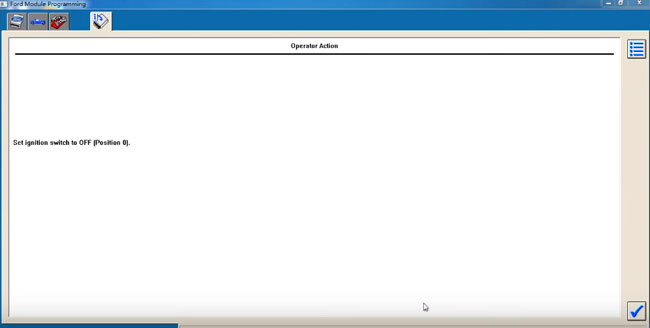
Set ignition switch to OFF
ignition-off
During the module programming, this module goes through a VIN verification process.
This process compares the VIN in this module with the VIN in other modules on the vehicle. You may see the VIN verification screen more than once depending upon your response to the question.
vin-verification
VIN is correct?
confirm-vin
Install a new module in vehicle
install-new-module
Do not start a reprogramming section with a low battery in the vehicle and/or programming tool.
The fuel pump and the engine cooling fans may run during the following procedure
If you are programming a 6.0L diesel, the FICM relay must be removed before programming
ficm-relay
Set ignition switch to ON
ignition-on
Erase procedure in process
erase-procedure
PCM reprogramming
pcm-reprogramming
Set ignition switch to OFF
ignition-off
in-progress
Set ignition switch to ON
switch-to-on
Set ignition switch to OFF
switch-off
Calibration has been loaded and checked
calibration-loaded
If you programmed 6.0L diesel, please reinstall the FICM relay
reinstall-ficm-relay
If required, obtain a PCM reprogramming label and complete as the screen displays
pcm-programming
Start engine
start-engine
Set ignition switch to OFF
switch-off
Set ignition switch to ON
switch-on
Clearing fault codes
clear-fault-code
Set ignition switch to OFF
switch-to-off
Run programmable module installation to correct the VIN
Note: the modules listed may not be installed on the vehicle. Verify that the modules are installed before performing diagnostics
programming-success
VXDIAG VCX NANO for Ford programmed the PCM module successfully.

5/22/2017

Ford IDS 105 Review: 100% with VCM2, Vxdiag Vcx Nano Ford

Have downloaded Ford diagnostic software IDS 105.01 on a web to have a try… And luckily, it worked finally although there was a bit trouble i met. Works perfectly with Vxdiag Vcx Nano for Ford and Ford VCM2 clone on F150, Focus, Explorer…


I’m using the link with Ford IDS V105.01 + VCM II Manager 2.3.85.7:
Part 1
Part 2
Pass: nK6gE84


About Ford ids 105.01 installation:

Just Downloaded & extracted
Opened in VMWARE 10.
(In one of the first couple of lines in config file change the “12” to “10”)
Clicked “I MOVED IT”
Turned of internet (don’t know if it matters).
Turned off nonpersistent
Started Up IDS 105.1 VMWARE
Plugged in OEM VCM and installed drivers
Made cosmetic changes, performance changes to WIN7
Opened IDS and made settings changes
Ran Shut down command in Guest System
Turned nonpersistent back on

I mean I just made persistent HDD, then I installed drivers, restart. I checked license of VXDIAG… Then non persistent and now is ok.


About VCM2 IDS 105 test result:

– Ford Focus key programming….Worked!
I’ve programmed a Ford Focus blue key with this virtual machine and Ford VCM2 clone. No issues!
ford-ids-v105-1
– 2015 F150 Car Configuration Parameters….Worked!
I’ve used it on 2015 F-150 to enable Car Configuration Parameters without any problem
ford-ids-v105-2
– 2013 Explorer key programming & PCM flash….Worked
I did 6 module programming on a 2013 Explorer yesterday and all OK!
Ford IDS worked great today. Programmed a few keys and flashed a PCM already. Working flawlessly.

Hope it keeps it up.


About workable Ford diagnostic tools:

Except VCM2 clone tried, i also tested with the latest VCX manager and updated firmware on the VXDIAG VCX NANO Ford…great!

I can now confirm both of these images are working with the Allscanner VCX Brand. Not sure if it makes any different from others but I used the latest VCX manager from the website: http://www.obdii365.com/wholesale/wifi-vxdiag-vcx-nano-for-ford-mazda-2-in-1-with-ids.html

5/15/2017

Free Download Ford IDS 105.02 Mazda IDS 105.02 for VXDIAG and VCM2

Latest 05.2017 IDS Update Ford Mazda here! You can free download Ford IDS 105.02A and Mazda IDS 105.02 software in mega. All working links, check below:

Note: All these are just the EXE updates files not the whole VM. It’s for DIYer with Ford VCM 2 and VXDIAG VCX NANO Ford!
Download Ford IDS 105.02A:
Download Mazda IDS 105.02:
Link 1
Link 2
Ford IDS 105.02A Mazda IDS 105.02 Referred Tools: (Still testing)

Ford VCM2 VCM II Ford Mazda 2 in 1 with Ford IDS V105 and Mazda IDS V104
ford-vcm2
VXDIAG VCX NANO for Ford and Mazda with Ford IDS V101/Mazda IDS V104
vxdiag-vcx-nano-ford-mazda 
Both VCM II Ford Mazda and VXDIAG VCX NANO for Ford and Mazda share same price $99 and almost same functions:
  1. Programming & Installation of new ECUs (PCM, ABS, Instrument Cluster, Air Bag, Fuel Pumps, etc.)
  2. Live Data-stream with Recording & Playback Functions for Main ECUs
  3. Read & Clear Diagnostic Trouble Codes (DTCs)
  4. Set, Adjust or Remove Speed Governors
  5. Automatic vehicle recognition
  6. New Software Re-flash for Existing ECUs
  7. All Other Dealer Functions
  8. Steering Angle Resets
  9. Guided Fault Finding
  10. Program New Keys
  11. DPF Regeneration
  12. Brake Bleeding
  13. Injector Coding

5/09/2017

Free Download Toyota Techstream V12.10.019 with Activation 5000 days

Free download Toyota TIS Techstream V12.10.019 diagnostic scanner software crack (05-2017 released) on Mega:


Free to use
NO need techstream activation/registration key
5000 Days all region patch included.
techstream-12-10-019
Credits to SCOTT in the MH community

Is there any difference from 02/2017 edition (12.00.129) ?
Support for new cars, fixing old bags.

The important note-
Not sure of its security because it’s not tested;
Safe to use tested version of toyota techstream crack

Techstream for Mangoose VCI
Toyota Techstream  for MINI VCI
Techstream V12.00.127 for VXDIAG VCX NANO for Toyota

All techstream software and cables above are tested and verified to work perfectly by professionals working for obdii365.com.

As for techstream scan tools,
Toyota customization–>MINI VCI
Toyota obdii diagnostics–> MINI VCI cable
Toyota techstream ecu programming—>VXDIAG VCX NANO for Toyota
Toyota techstream key programming—>VXDIAG VCX NANO Toyota

Toyota techstream manual:
How to install Techstream 12.00.019 software:

How to do Toyota techstream key programming:

How to reset smart code for Lexus Lx570:

http://blog.obdii365.com/2017/05/09/toyota-techstreamv12-10-019-free-download/

4/23/2017

Will Vxdiag Vcx Nano Techstream do Toyota H chip all keys lost?

Toyota H chip all keys lost with Toyota Techstream, how to do? Here is the step-by-step instruction for you. Wish it helps.


First you should buy a Toyota OEM Standard Transponder Key : H Chip (Non-Valet) / 89785-0D 170 / TOY 44H. Because it is frequent that non original Toyota H key sold on Ebay will not work.
toyota-oem-h-key

Then the step to follow to pragram (Non-Valet) / 89785-0D 170 / TOY 44H key on 2014+ Toyota.

With Vxdiag vcx nano for Toyota running Techstream V12.00.127, you need disassemble the immo box for some models

Download and install Techstream 12.00.127 on Windows 7, with the help of the user guide from http://blog.obdii365.com/2017/04/07/install-toyota-techstream-12-00-127-on-windows-7/
Disassemble the immo box
Plug the vxdiag vcx nano Toyota scanner into the OBD2 socket and connect the other end with laptop via USB port
Inserted the master key and turned the ignition to ON.
Click on “Connect to Vehicle”
Connection….
select 2WD or 4WD, 4WD of course.
run a Health Check and the Techstream software was well communicated with all the ECMs for various systems.
started by programming the remote keyless door lock functions
chose “Main Body” in “System Selection Menu”
techstream-main-body
select “Utility” and “Wireless Code Registration.”
Wireless-Code-Registration
Follow the “Wireless Code Registration Wizard” popped up windows prompts:
registration
key programming is complete (took 2 minutes).
Click on “Next” to program another key or “Exit” if finished.

Now start programming the immobiliser chip so the key would actually start the engine.
chose “Immobiliser” in “System Selection Menu”
system-selection
Select “Immobiliser Live” tab appeared
click on “Utility” and “Key Registration”
Key-Registration
Another wizard popped up…turn the ignition off, then back on and next. Then it asked me to turn it back off, remove the master key, insert the new key and next.

The security light started flashing, as a timer on the screen counted down from about 90 seconds while the ECU learned the new key code. Once the counter got down to zero, it said “Programming Complete” and showed a “Next” and “Exit” button as before. Then tested the key, started the engine, locked/unlocked the doors and it all worked perfectly.


Alternatively, you can program keys via OBD (the easiest method) using an Obdstar key programmer

Obdstar x300 pro3 key master: for locksmiths
obdstar-x300-pro3
Obdstar F101 Toyota: for diy users/ Toyota owners
obdstar-f100
Obdstar f101 key programmer supports 4D(67,68) chip, 72 chip(WITH G,EUROPE), smart key immobilizer reset (All keys lost) .

How to program Toyota H chip key through OBD

4/20/2017

How to use Allscanner VXDIAG A3 Multi Tool for BMW JLR VAG

This post topic: How to use 2017 Allscanner VXDIAG A3 scanner to diagnose, program and code BMW, VAG, Jaguar and Land Rover.

VXDIA A3 wins ICOM VAS5054 SDD at:
  1. VXDIAG A3 function & vehicle coverage = BMW ICOM + VAS 5054a + JLR SDD. It covers BMW, LAND ROVER & JAGUAR, VW also latest DOIP and perform diagnose, programming, coding etc. With newest software ISTA-D V40.01 ISTA-P V3.59 , SDD V148 & ODIS 4.0.
  2. VXDIAG A3 price $429 < BMW ICOM price + VAS5054 price + JLR SDD price (cost more than $600)
  3. No OS limited, A3 works on: XP, WIN 7/8/8.1/10;
  4. Client requirement: Browser: IE 11+ and google Chrome

Step –by –step on how to use VXdiag A3?
Incl. Allscanner VXDIAG A3 scanner Install VX Manager, USB driver, OEM driver, and run Original Factory Diagnosis Software.
Step 1. Firstly install VX    Manager
Browse http://www.vxdiag.net/ , download and install “VX manager” driver (VXManager Installation steps:
1. Run VX Manager.exe to setup
2. Click [Next]
3. Select [I accept the agreement],then click [Next]
4. During installation, disconnect USB cable to the PC, then click [Next]
5. Software Installing……
6. VXDIAG SDK Driver installing……
7. Setup complete.click [Finish]
Setup complete. The shortcut will create on the desktop.
Connection device and run VX Manager, The information of device will be displayed in “Device Manager”.


Step 2. Connect VXDIAG A3 by USB or WIFI
Hardware USB Connection or WiFi Connection
Connect OBDII cable to the vehicle 16pin diagnostic port, and USB cable to the computer.
vxdiag-usb-connection
Hardware WiFi Connection
vxdiag-wifi-connection
Here step – by –step guide:

Step 3. Installation OEM Driver for JLR SDD, ODIS and BMW ICOM
Click [Diagnostic Apps] tab on VX Manager software interface, then click [My Apps]
vxdiag-j2534-software
Click [JLR SDD] and you will get a driver installation window, then click [Install]
If JLR SDD have been installed, then click [Update] to Update JLR SDD driver.
jlr-sdd
“Install Complete” click [close]
Next is to install / update ODIS 4.0 and BMW ISTA-D V40.01 ISTA-P V3.59.
Here Step –by –step procedure


Step 4. Buy License and Update
If you want to add more vehicle brands, contact OBDII365.com dealer to provide VXDIAG SN, buy License .
Here on how to buy license and update:
1.Check the S/N on the back of the VXDIAG main unit
2. Buy License
Contact your dealer to provide VXDIAG SN, buy License. License list
PASSTHRU
PDU
TOYOTA
HONDA
JLR
SUBARU
PORSCHE …
3. Update License
1). Buy License
2). After buy License, connection VXDIAG to PC
3). Start [VX Manager]
4). Click [Device Manager]->[Information],then click [License]
After License updated, then installation OEM driver. For example, Buy JLR SDD license, then Installation JLR SDD Driver


How to update VXdiag A3 OBD2 scanner firmware?
VXDIAG Firmware Upgrade procedure:
1. Connection VXDIAG to PC
2. Start [VX Manager]
3. Click [Device Manager]
4. Click [Information]
5. Click [Firmware]
6. Click [Upgrade] to Upgrade Firmware.
During Upgrade, do not disconnect VXDIAG connected PC

VXDIAG software update: after the newest software is released, you will be noticed to update. I am sure for VCM, Jaguar and Land rover, VXDIAG software is always newest.


VXDIAG A3 Diagnostic Tool Video Guide:
BMW F18 Coding by VXDIAG A3 BMW E-sys 3.27.1
https://youtu.be/_dLLLuSBEOk
JLR Jaguar Land rover Service Reset by Allscanner VXDIAG SDD
https://youtu.be/Xr07d5nU62s
How to use Allscanner VXDIAG JLR dataloger function
https://youtu.be/UDsWQrnJLy4