Showing posts with label mini vci. Show all posts

11/11/2019

Free Download Toyota Techstream 14.30.023

Free download Techstream 14.30.023 dealer software for obd2 diagnosis and programming on Toyota, Lexus, Scion:

Release Date: 2019/11
Version: 14.30.023
techstream-v14-30-023
Multilingual (without Russian):
Chinese, English, French, Italian, Spanish, German, etc.
System requirements: Windows XP-10 x32 and x64
Minimum PC requirements
Supported OSWindows XP SP2Windows Vista 32 bit (64 bit not supported)Windows 7 – 32 bit
Main memory512MB1GB1GB
Display resolutionRecommended: 1024×768 – Minimum: 1024×600
Available Hard Disk Space256MB
Processor speed1 GHZ
USB1 USB 1.1 or 2.0 port free
NetworkInternet Connection required for software activation


Techstream activation: pls go to the thread http://garageforum.org/Thread-TS-All-Ver…on?page=98


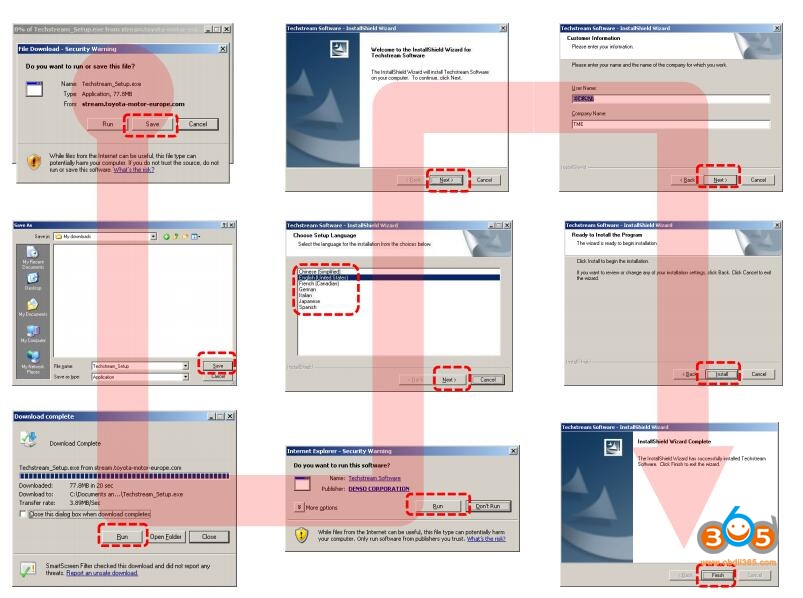
Techstream software installation:
instruction:
install-techstream-v14
video:

VERY VERY VERY IMPORTANT:

If you cannot get Techstream activated and make it go, it’s your way to go:
Techstream inside the kit is confirmed to work well for Toyota customization, obd2 diagnosis and programming.

TIS is available in three different levels. The link above (VXDIAG VCX NANO Techstream) has the full functionality.

Subscription Level FeaturesTechstream StandardTechstream Professional
Diagnostic
Techstream Security
Professional
TIS Library
Service BulletinsYesYesYes
Repair ManualsYesYesYes
Wiring DiagramsYesYesYes
Technical TrainingYesYesYes
Other Technical InformationYesYes
Diagnostics / Reprogramming
Techstream Scantool SoftwareYesYes
ECU CalibrationsYesYes
Identifix Direct-HitYesYes
Security
(U.S. and Mexico VINs only)
Key CodesYes
Immobilizer / Smart ResetYes
* Mini VCI J2534 cable remain untested. You are at you risk.

12/03/2017

Toyota Techstream 12.30.017 Software Free on Mega

(12/2017) Free download TOYOTA TIS Techstream V12.30.017 software and install on Windows 7 or Windows 10, to get it work with Techstream cables like Mini vci j2534 cable, Vxdiag vcx nano for toyota diagnostic tool, etc. 
toyota- techstream 12.30.017
 TOYOTA TIS Techstream V12.30.017 download free:
Ver: 12.30.017
Password: Not required!
Security: Unknown

TOYOTA Techstream V12.30.017 activation:

Credits to Autokent

Toyota Techstream 12.20.024 crack download with security:
It’s crack version. No need activation
Tested OK with Mini VCI cables (SV46, SV46-B), Mangoose VCI (SV46-C) and Vxdiag Vcx Nano for Toyota

Techstream install windows 7:
Step 1: install Toyota Techstream 12.20.024 software

open Techstream 12.20.024 disk F:
copy all files to another new folder on Desktop
open Techstream 12.20.024 setup application
choose a setup language for installation
preparing setup
Next to install Techstream software
accept the agreement
enter the user name and company name, then Next
begin Techstream 12.20.024 installation
installing Techstream 12.20.024…
successfully installed Techstream
Finish Techstream v12 installation


Step 2: replace the MainMenu.exe

copy the MainMenu.exe
go to Techstream Properties on Desktop
open file location
paste and replace MainMenu.exe in Program files/toyota diagnostics/techstream/bin


Step 3: install MVCI driver

run MVCI driver for TOYOTA TIS SETUP
Next to install MVCI driver
Install
installing MVCI driver
Finish MVCI driver installation


Step 4: register Techstream

run Techstream application on Desktop
Yes to continue
close the internet explorer
this is Toyota Techstream ver.12.20.024 interface
register Techstream software 12.20.024
it’s Techstream crack version
use key (attached to the Instructions.txt) to register
OK
exit Techstream


Step 5: check MVCI fw version

run MVCI firmware update tool on Desktop
exit MVCI firmware update tool


Step 6: run Techtsream 12.20.024
run Techstream application on Desktop for use


Techstream install windows 10:

This is a how-to’s of TechStream10.10.018 on my Windows 10 64-bit tablet. Here are the steps:

  1. Installed TechStream software

  1. Extracted XHorse install package into temporary directory, e.g. in command shell msiexec /a “MVCI Driver for TOYOTA.msi” /qb TARGETDIR=<destination path>
Where destination path = path to temporary directory

  1. Copied contents of extract to C:\Program Files (x86)\XHorse Electronics\MCVI Driver for Toyota TIS\

  1. Downloaded and installed the 64-bit registry hack (contents below – save text to file and name file with .reg extension, run to install via RegEdit)

Windows Registry Editor Version 5.00:

[HKEY_LOCAL_MACHINE\SOFTWARE\Wow6432Node\PassThruSu pport.04.04]

[HKEY_LOCAL_MACHINE\SOFTWARE\Wow6432Node\PassThruSu pport.04.04\XHorse – MVCI]
“Name”=”XHorse – MVCI”
“Vendor”=”XHorse ELECTRONICS Co.,Ltd.”
“ConfigApplication”=”C:\\Program Files (x86)\\XHorse Electronics\\MVCI Driver for TOYOTA TIS\\FirmwareUpdateTool.exe”
“FunctionLibrary”=”C:\\Program Files (x86)\\XHorse Electronics\\MVCI Driver for TOYOTA TIS\\MVCI32.dll”
“APIVersion”=”04.04”
“ProductVersion”=”1.1.0”
“ProtocolsSupported”=”J1850VPW:1, J1850PWM:1, CAN:1, ISO9141:1, ISO14230:1, ISO15765:1”
“J1850VPW”=dword:00000001
“J1850PWM”=dword:00000001
“ISO9141″=dword:00000001
“ISO14230″=dword:00000001
“CAN”=dword:00000001
“ISO15765″=dword:00000001
“SCI_A_ENGINE”=dword:00000000
“SCI_A_TRANS”=dword:00000000
“SCI_B_ENGINE”=dword:00000000
“SCI_B_TRANS”=dword:00000000

  1. Rebooted tablet
  2. Plugged in J2534 Mini-VCI cable. Windows 10 automatically detects the cable. You will notice in device manager it adds 3 devices:

Ports (COM & LPT) -> USB Serial Port (COM<n>) where <n> = a system assigned number
Universal Serial Bus Controllers -> USB Serial Converter
Vehicle Interface Module

Interestingly enough, Windows 10 installs the most up to date drivers for these devices. I tried to manually install the MVCI drivers from the MSI, no avail – on reboot, Windows 10 overwrites these.
Anyways, I don’t think manually updating the drivers is necessary with the registry hack.
  1. Loaded TechStream
  2. In the menu, go to Setup -> VIM Select -> select Interface Setup = XHorse – MVCI
  3. Turn vehicle to ON, position II
  4. Select ‘Connect to Vehicle’ and you should be able to connect!

9/18/2017

Techstream 12.20.024 test working with VXDIAG VCX NANO for Toyota

(09/18/2017) Toyota Techstream V12.20.024 is tested without issues on Windows 7 operation system and verified to work like a charm.
version: Techstream V12.20.024 crack
O.S.: Windows 7 32bit
workable devicesMINI VCI cables and Vxdiag Vcx Nano for Toyota
(Software download will be attached a few days later. It’s crack version, does not reuqire activation code)

ECU: TOYOTA Yaris 2007 1NZ-FE
Techstream-tv12.20.024-yaris-2007-ecu
WE ARE TESTING…
_Techstream--12.20.024-download-tested-OK-1
_Techstream--12.20.024-download-tested-OK-2
_Techstream--12.20.024-download-tested-OK-3
_Techstream--12.20.024-download-tested-OK-4
_Techstream--12.20.024-download-tested-OK-5
_Techstream--12.20.024-download-tested-OK-6
_Techstream--12.20.024-download-tested-OK-8
_Techstream--12.20.024-download-tested-OK-9
_Techstream--12.20.024-download-tested-OK-10
_Techstream--12.20.024-download-tested-OK-11
_Techstream--12.20.024-download-tested-OK-12
Tested with MINI VCI (item no.SV46-B/SV46-D)
sv46-d-mini-vci

Tested with Mangoose VCI (item no. SV46-C)
sv46-c-mangoose-vci
vxdiag-vcx-nano-for-toyota
Test result: Toyota Techstream 12.20.024 is tested successfully!!


with Toyota Techstream cables (Mini vci or Mangoose vci), you can customize your car;

with Vxdiag vcx nano Toyota,  you can not only have customization but do programming via WIFI.

5/09/2017

Free Download Toyota Techstream V12.10.019 with Activation 5000 days

Free download Toyota TIS Techstream V12.10.019 diagnostic scanner software crack (05-2017 released) on Mega:


Free to use
NO need techstream activation/registration key
5000 Days all region patch included.
techstream-12-10-019
Credits to SCOTT in the MH community

Is there any difference from 02/2017 edition (12.00.129) ?
Support for new cars, fixing old bags.

The important note-
Not sure of its security because it’s not tested;
Safe to use tested version of toyota techstream crack

Techstream for Mangoose VCI
Toyota Techstream  for MINI VCI
Techstream V12.00.127 for VXDIAG VCX NANO for Toyota

All techstream software and cables above are tested and verified to work perfectly by professionals working for obdii365.com.

As for techstream scan tools,
Toyota customization–>MINI VCI
Toyota obdii diagnostics–> MINI VCI cable
Toyota techstream ecu programming—>VXDIAG VCX NANO for Toyota
Toyota techstream key programming—>VXDIAG VCX NANO Toyota

Toyota techstream manual:
How to install Techstream 12.00.019 software:

How to do Toyota techstream key programming:

How to reset smart code for Lexus Lx570:

http://blog.obdii365.com/2017/05/09/toyota-techstreamv12-10-019-free-download/