Showing posts with label vxdiag scanner. Show all posts

8/22/2018

VXDIAG Porsche: Confirmed Working with Piwis 3 V37.250.020

VXDIAG Porsche Piwis 3 V37.250.020 tips and guides for newbies:

Porsch Piwis 3 Software:
Piwis III V37.250.020 – confirmed to work no issues with Vxdiag Porsche
Diagnostic test: passed
Coding: passed
Programming: passed

Porsche Piwis 3 Overview:
Porsche Piwis 3 diagnostics, applications, tools and system.
vxdiag-porsche-piwis3-1

VXDIAG Porsche Piwis 3 All Details:
– Porsche Piwis 3 diagnosis + car list
– Porsche Piwis 3 Engineering
– Porsche Piwis 3 wiring diagram
– Porsche Piwis 3 remote help

In detail…

Part 1: Porsche Piwis 3 Diagnostics:
Here, connect to the ECU and select “Manual model line selection”.
vxdiag-porsche-piwis3-2
Porsche Piwis III car list:
works with Porsche 911, Boxster, Cayman, Cayenne, Panamera (971 & 970), Macan, 918 Spyder etc.
Take Panamera 971 (after 2017)
vxdiag-porsche-piwis3-3
vxdiag-porsche-piwis3-4
vxdiag-porsche-piwis3-5
Note: compared with Piwis 2, Piwis 3 combine the programming and coding menu in one menu.
Control units for diagnostic tests
vxdiag-porsche-piwis3-6
Select “Gateway” and continue.
– Extended identifications
vxdiag-porsche-piwis3-7
– Fault memory
vxdiag-porsche-piwis3-8
– Data stream
vxdiag-porsche-piwis3-9
– Coding and programming
vxdiag-porsche-piwis3-10
– Maintenance repairs
vxdiag-porsche-piwis3-11
Part 2:Piwis 3 Engineer software
Go to System for Diagnostics configuration for 991,981, 918, 970, Cayenne from MY11, Macan
vxdiag-porsche-piwis3-12
vxdiag-porsche-piwis3-13
– Version information
vxdiag-porsche-piwis3-14
– Mode options – E refers to Engineering
vxdiag-porsche-piwis3-15
– Choose “E” for the engineering version
Note that, after you change the mode to “E” and want to enter to change to other mode you will be disallowed, you need to restart the software. This is another difference between the PIWIS tester III and II. The developer claims to make a normal mode and develop mode for switch as free as you like.
vxdiag-porsche-piwis3-16
Part 3: Porsche Piwis III Wiring diagram
Go to Application to get Wiring diagram
vxdiag-porsche-piwis3-17
Choose a model and read the wiring diagram.
vxdiag-porsche-piwis3-18
For the model after the year 2017, you need Porsche PIWIS 3
vxdiag-porsche-piwis3-19
You can use the mouse to move the wiring diagram as you like.
vxdiag-porsche-piwis3-21
Part 4: Porsche Piwis 3 Team viewer
vxdiag-porsche-piwis3-22
Porsche piwis 3 tech support from obdii365.com via Team Viewer

7/18/2017

VXDIAG VCX NANO Pro Version Diagnostic Tool for Multi-Brands

Allscanner VXDIAG tech now is rolling out new VXDIAG VCX NANO Pro version series diagnostic tools to replace previous vcx nano.


VXDIAG VCX NANO vs. NANO Pro version:

VXDIAG VCX NANO= one machine one software (cannot add other car brand software)

VXDIAG VCX NANO Pro=one machine multi software (add software via authorization )

vxdiag-vcx-nano-pro-1
vxdiag-vcx-nano-pro-2

vxdiag-vcx-nano-pro-3

First release:
VXDIAG VCX NANO PRO For GM/FORD/MAZDA/VOLVO 3 in 1 OBD2 Auto Diagnostic Tool 


This item default software are GM Ford Mazda Volvo 3 in 1.You can pay to add other car models software authorization  i.e VW/HONDA/TOYOTA/JLR.


The authorization fees for each car model:
Toyota or VW: 70USD
Ford&Mazda or JLR or Volvo:85USD
GM: 90USD
Honda:110USD

3.Multi-languages:
English/Japanese/Portuguese/Romanian/Korean/Dutch/Polish/Turkish/Spanish/French/Italian/Croatian/Danish/German/Swedish/Finnish/Slovenian/
Czech/Russian/Greek/Chinese

4.Computer requirements:XP/WIN7/WIN8/WIN10

User Notice:Close Antivirus software when install the software.


VXDIAG VCX NANO PRO 3 In 1 Functions:

1. Programming & Installation of new ECUs (PCM, ABS, Instrument Cluster, Air Bag, Fuel Pumps, etc.)
2. Live Data-stream with Recording & Playback Functions for Main ECUs
3. Read & Clear Diagnostic Trouble Codes (DTCs)
4. Set, Adjust or Remove Speed Governors
5. Automatic vehicle recognition
6. New Software Re-flash for Existing ECUs
7. All Other Dealer Functions
8. Steering Angle Resets
9. Guided Fault Finding
10. Program New Keys
11. DPF Regeneration
12. Brake Bleeding
13. Injector Coding

VXDIAG VCX NANO PRO--GM

Version:2016.02

Compatible Software:
Support PC-based diagnostics with rollout of the Global Diagnostic System GDS & GDS2
Support GM TIS2WEB online Service Programming System (SPS) with your own G-M account.
Support Tech2Win application to offering a larger screen with all of the Tech 2 tool functionality

Global Diagnostic System (GDS & GDS2)
New Diagnostic Application Software required for all GM Global Architecture (Global A) Vehicles.
GDS & GDS2 is software which runs on a specific PC. Updates received via TIS2Web.

Service Programming System (SPS):
You need have your own G-M account if you want to do online programming.
Passthrough programming on G-M past model and Global A vehicles
Increase reprogramming speed 20-70% and get ready to service new models

For pass-through programming of electronic control units on all vehicles built since 1996 and future model releases. The VCX Nano KIT is between 20% and 70% faster than Tech 2.For example, on a new Tahoe hybrid with 7 ECUS, it would normally take 2 full hours to reprogram. But, with VCX Nano the process is completed in just 45 minutes. That’s a 64% difference and means you could service 10vehicles rather than 4in an 8-hour day! The potential to increase revenues is dramatic.

Tech2Win Function:

Tech2Win, an application version of the Tech 2 and CANdi (Control Area Network diagnostic interface) moduleTech2Win can be used during a vehicle road
test, offering a larger screen with all of the Tech 2 tool functionality. The Tech2Win application offers all of the features and functions of the Tech 2 for Opel, For Saab etc.

Support all models of Cherolet,Buick and Cadillac, multi-languages selection, support OEM softwares of for gm gds2 and tech2win, run gds2 on Vmware. Support online diagnostic and programming as OEM tool.

VXDIAG VCX NANO PRO--FORD&MAZDA

Ford IDS Version: V101
Mazda IDS Version:V104

Can diagnose cars till 2017, it support online programming, one device support both Ford IDS and Mazda IDS.

Functions tested successfully:

Record and play back live data for ABS, PCM…tested ok
Program and Install new ECUs (PCM, ABS)…tested ok
Read and Clear DTCs…tested ok
Program New Keys for Mazda 6…tested ok
Set, adjust or remove speed governors…tested ok
DPF Regeneration…tested ok
Automatic vehicle recognition…tested ok
All other dealer functions…tested ok
Reset steering angle…tested ok
Find guided fault…tested ok
Injector Coding…tested ok

VXDIAG VCX NANO PRO--Volvo
Software Version: Volvo VIDA 2014D


Optional Software Authorization:


VXDIAG VCX NANO PRO--VW

VW Version: ODIS 4.0

Software Features:
Providing drivers consistent with international standard SAE-J2534 / SAE-J2534-1;
VCX is a standard Passthru programming tool, which can do online ECU programming;
VCX Interface Key Features:

1. Fully compatible with SAE J2534;
2. Especially for cars, and all vehicles protocols are compatible with dual Cell processors;
3. Design adapters and cables with self-determination;
4. Fits CE and FCC hardware;
5. Fireware can be updated;

Support protocols as below:
1.K line (ISO9141-2)
2.High-speed CAN (ISO 11898-2)
3.Low-speed CAN (ISO 11898-3)
4.J1850 (SAE J1850)
5.UDS
6.PWM


VXDIAG VCX NANO PRO--Toyota

Software Version: Techstream V12.10.019

VCX Software Features:

Providing drivers consistent with international standard SAE-J2534 / SAE-J2534-1;
VCX is a standard Passthru programming tool, which can do online ECU programming;


VXDIAG VCX NANO PRO--LAND ROVER &JAGUAR

LAND ROVER &JAGUAR Version:SDD V149


VXDIAG VCX NANO PRO--Honda
Honda Version:HDS V3.014.011

7/05/2017

VXDIAG Multi Tool for BMW & Mercedes Benz Diagnosis and Programming

Allscanner has released new VXDIAG Multi Tool for BMW and Mercedes Benz 2-in-1. Software support full-system diagnosis, coding and programming as original software. It is an ideal replacement of BMW ICOM and MB Star diagnosis system.

vxdiag-multi-tool-bmw-mercedes
Top features of VXDIAG BMW Mercedes:

1. With this VXDiag firmware, you can add more cart brand software into it. Only need buy authorization from us. Already released original software authorization has GM, Ford, Mazda,Toyota, Honda, LandRover, Jaguar, Subaru,Volvo,VW and Porsche.

2. VXDiag Multi Diagnostic Tool is compatible with original BMW and BENZ software if you have, we also provide software Hard disk which can compatible with CF-30 and THINKPAD T420 laptop.( at least 2GB memory, recommend 4GB memory)

3. Hardware support 4-way CAN BUS and 2-way K - Line/L-Line, support multi-protocol high-speed and concurrent communication
vxdiag-vcx-bmw-mercedes


VXDIAG Multi Scanner BMW Software Functions:


1.VXDIAG for BMW Function Introduction:

The new BMW software can perform programming and coding for all BMW E/ F/ G series cars. Same as BMW ICOM Next / A2 / A3/, ALLSCANNER VXDIAG BMW supports all BMW software and is good at fiber programming. 


The main diagnostic software includes:
BMW ISTA-D (Diagnostic);
BMW ISTA-P (Programming)
BMW Group ISPI (the fourth generation of BMW diagnostic software client);
E-SYS (Engineer Software for F series, available for programming, coding, customization, realize hidden functions, advanced features);
WINKFP (for E series: programming, upgrade and downgrade);
Tool32 (enter key, import codes, delete certification, advanced features of BMW series);
INPA (read vehicle information, diagnosis, read and clear trouble codes);
BMW Coding (for E series: import data, change the code or realize hidden functions);
KSD2 (offer full vehicle repairing information for diagnosis or programming);
NCS-Expert tool (for E series: set codes, realize hidden functions and change settings);
BMW software includes the engineer version, which is the quick and easy diagnostic programming and coding system that German BMW engineers are using. The system is designed in English and German. The Engineer version is so practical and powerful that it can achieve professional features which all the original professional computers can realize, can change the language into Chinese through the OBD port for import cars (Europe regulation cars, the United States and the United States, Africa, etc.). Features mainly include: diagnosis, programming (incl. programming one module only), coding, realize hidden function, new features activation, the module system update.

BMW software version: 
Diagnosis: ISTA-D V40.01.21, Programming: ISTA-P V3.59.4.004

Following functions can be activated based on the existing configuration model:
01 use the button in the cab to close the trunk (electric tailgate), to terminate the reverse operation at any time (available in cars with the electric tailgate)
02 activate the Bluetooth phone function, to automatically play the music inside the phone every time you start the car. (Available in models with a USB port in the armrest box or gear)
03 support audio and video playback via USB cable as well as via iPod.
04 connect to the phone through the Wi-Fi (mobile phones are required to install software)
05 open the voice recognition function (currently only available in English digital telephone dialing)
06 operate the navigation menu when driving, watch DVD (Even the original car is available with CD, you can also watch DVD)
07 Active internet applications (available in post 2012.09 models with professional navigation, but some unsupported with unclear reasons)
08 immediately fold the rear-view mirror with the remote control (for the original car, owners need to press the lock key for 1.5 seconds)
09 activate gearbox program on the sport cars, at a quicker response for speeding up. But it will cause fault codes in ECU test in the 4S shop. (NOT recommended)
10 effectively prevent rear-end collision because brake lights flash quickly when braking severely (for 3 Series 5 Series, testing)
11 use mobile phone traffic to surf the Internet on iDrive via the phone Bluetooth (not tested yet)
12 adjust the warning speed of changing a lane (available in high-end cars with the rearview mirror with the dead angle warning indicator) (not tested yet)
13 automatically released the handbrake (parking button) when the vehicle is started (testing)
14 add the lane departure system and roadside warning identification function (available in optional cars with front cameras) (not tested yet)
15 L7 around Sound Pro

Personalized Customization


1. Set Seat Belt Alarm time
2. Disable passenger Seat Belt Alarm
3. Disable driver Seat Belt Alarm
4. Set the engine on/off status the same as that before the ignition off or the default status off.
5. Set the central lock automatically unlock when ignition off
6. Set Fuel Economy Mode as default mode after ignition on
7. Enable roll up window when open car door
8. Enable the option of DRL (Day Running Lights) on or off.
9. Set Highlight auxiliary and intersection traffic light “Automatic”
10. Enable to adjust DRL brightness (the default factory setting is brightest)
11. Set fog light turn on while headlight is on
12. Enable to Lock/Unlock sound and adjust the volume
13. Enable auto close sunroof when raining (May lead to initialize sunroof, it will work only after ignition on for 10 seconds, not very effective.)
14. Set windshield wiper Back in place when ignition off
15. Set sunroof automatically close in a tilted state (It needs to initialize sunroof)
16. Set the turn signal light on/off times (F30)
17. Enable CIC menu display CI version
18. Three Bluetooth phone rings available
19. Enlarge phone number and text storage (25 to 50) A/C (Automatic Air Conditioning)
20. Set indoor internal circulation memory the same as that when the ignition off last time.
21. Set air conditioning memory the same as that when ignition off last time.
22. Display engine output power and torque on navigation screen
23. Cancel home screen boot delay confirm message
24. Cancel rear view camera statement when reversing
25. Display available gas station on navigation
26. Display speed limit info (Need hardware support)
27. Display engine torque menu
28. Auto headlight
29. TPMS
30. Display tire pressure and temperature (Need hardware support)
31. Adjust mile to kilometer
33. GPS time synchronization
34. Dashboard stimulate instant fuel consumption: change from 20 to 30
35. Enable dashboard light on always
36. Enable dashboard light always on at night (For BMW 535, GT, 7 series and part of BMW 530)
37. Enable dashboard light always on at daytime (For BMW 535, GT, 7 series and part of BMW 530)
38. Enable dashboard lights turn grey (For BMW 535, GT, 7 series and part of BMW 530)
39. Enable dashboard lights turn orange or grey (For BMW 535, GT, 7 series and part of BMW 530)
40. DS Mode display current shift from S1 to S7
41. Set Head-Up Display (Navigation map distance and turn signal, etc.) (Need hardware support)
42. PDC reversing radar is changed vertically and horizontally

VXDIAG Mercedes Software Functions:


Benz software include two versions of PASSTHRU & PDU,including DAS, Xentry software.Version of PDU support new car models of 222,213,205 etc,other car models need to use passthru version to diagnose. Not support old models of 210, 203,220 with K-Line communication. It support connections of WIFI,LAN and USB.

VXDIAG can access to following Mercedes systems:
Engines (All Gasoline & Diesel Systems)
Transmissions and Electronic Selector Modules
Airmatic and Active Body Control Suspension Systems
Traction Systems: ESP / ASR / ETS / ABS / BAS / SBC braking systems
Supplementary Restraint Systems (SRS) / Airbag, All body modules OCP / UCP / LCP / SCM / SKF / KFB / RCM / DCM’s
Drive Authorisation System
Sam (Signal Acquisition) Modules
Electronic Ignition System (EIS)
Pneumatic System Equipment and ATA functions
Air Conditioning / climate control Systems
Instrument Cluster
Tyre Pressure Control
Parktronic System
Keyless Go
D2b Command & Audio Gateway (D2B and MOST networks)
TV Tuner
Headlamp Range Adjustment
Seat Electronics
Rvc, RST & Vario Roof modules
Automatic Clutch System ACS
M-Class Body Modules (AAM / EAM / DAS / SEM / VG Transfer Case)
Assyst & ASSYST + systems
vxdiag-bmw-mercedes

4/20/2017

How to use Allscanner VXDIAG A3 Multi Tool for BMW JLR VAG

This post topic: How to use 2017 Allscanner VXDIAG A3 scanner to diagnose, program and code BMW, VAG, Jaguar and Land Rover.

VXDIA A3 wins ICOM VAS5054 SDD at:
  1. VXDIAG A3 function & vehicle coverage = BMW ICOM + VAS 5054a + JLR SDD. It covers BMW, LAND ROVER & JAGUAR, VW also latest DOIP and perform diagnose, programming, coding etc. With newest software ISTA-D V40.01 ISTA-P V3.59 , SDD V148 & ODIS 4.0.
  2. VXDIAG A3 price $429 < BMW ICOM price + VAS5054 price + JLR SDD price (cost more than $600)
  3. No OS limited, A3 works on: XP, WIN 7/8/8.1/10;
  4. Client requirement: Browser: IE 11+ and google Chrome

Step –by –step on how to use VXdiag A3?
Incl. Allscanner VXDIAG A3 scanner Install VX Manager, USB driver, OEM driver, and run Original Factory Diagnosis Software.
Step 1. Firstly install VX    Manager
Browse http://www.vxdiag.net/ , download and install “VX manager” driver (VXManager Installation steps:
1. Run VX Manager.exe to setup
2. Click [Next]
3. Select [I accept the agreement],then click [Next]
4. During installation, disconnect USB cable to the PC, then click [Next]
5. Software Installing……
6. VXDIAG SDK Driver installing……
7. Setup complete.click [Finish]
Setup complete. The shortcut will create on the desktop.
Connection device and run VX Manager, The information of device will be displayed in “Device Manager”.


Step 2. Connect VXDIAG A3 by USB or WIFI
Hardware USB Connection or WiFi Connection
Connect OBDII cable to the vehicle 16pin diagnostic port, and USB cable to the computer.
vxdiag-usb-connection
Hardware WiFi Connection
vxdiag-wifi-connection
Here step – by –step guide:

Step 3. Installation OEM Driver for JLR SDD, ODIS and BMW ICOM
Click [Diagnostic Apps] tab on VX Manager software interface, then click [My Apps]
vxdiag-j2534-software
Click [JLR SDD] and you will get a driver installation window, then click [Install]
If JLR SDD have been installed, then click [Update] to Update JLR SDD driver.
jlr-sdd
“Install Complete” click [close]
Next is to install / update ODIS 4.0 and BMW ISTA-D V40.01 ISTA-P V3.59.
Here Step –by –step procedure


Step 4. Buy License and Update
If you want to add more vehicle brands, contact OBDII365.com dealer to provide VXDIAG SN, buy License .
Here on how to buy license and update:
1.Check the S/N on the back of the VXDIAG main unit
2. Buy License
Contact your dealer to provide VXDIAG SN, buy License. License list
PASSTHRU
PDU
TOYOTA
HONDA
JLR
SUBARU
PORSCHE …
3. Update License
1). Buy License
2). After buy License, connection VXDIAG to PC
3). Start [VX Manager]
4). Click [Device Manager]->[Information],then click [License]
After License updated, then installation OEM driver. For example, Buy JLR SDD license, then Installation JLR SDD Driver


How to update VXdiag A3 OBD2 scanner firmware?
VXDIAG Firmware Upgrade procedure:
1. Connection VXDIAG to PC
2. Start [VX Manager]
3. Click [Device Manager]
4. Click [Information]
5. Click [Firmware]
6. Click [Upgrade] to Upgrade Firmware.
During Upgrade, do not disconnect VXDIAG connected PC

VXDIAG software update: after the newest software is released, you will be noticed to update. I am sure for VCM, Jaguar and Land rover, VXDIAG software is always newest.


VXDIAG A3 Diagnostic Tool Video Guide:
BMW F18 Coding by VXDIAG A3 BMW E-sys 3.27.1
https://youtu.be/_dLLLuSBEOk
JLR Jaguar Land rover Service Reset by Allscanner VXDIAG SDD
https://youtu.be/Xr07d5nU62s
How to use Allscanner VXDIAG JLR dataloger function
https://youtu.be/UDsWQrnJLy4

10/13/2016

How to set up VXDIAG VCX NANO Cloud Diagnosis

VXDIAG VCX NANO series scanners (Ford/Mazda IDS, GM/Opel GDS2,JLR SDD,VAG ODIS,Toyota Techstream) has developed "Cloud Diagnosis" function without installing software.


What is Cloud Diagnosis?
-That means you do not need to install the software, you just need to install the VX Manger, then you can start to do the diagnosis!


Operating system:

Recommended using Microsoft WIN7 or higher system. Computers are required to

install the Microsoft IE11 or Google browser. Android and IOS systems are not supported


How to set up VXIDAG Cloud Diagnosis?


1.Installation of VXDIAG device driver management“VX MANAGER";


Accept license agreement


Here nothing to choose, directly click on "NEXT" go down:


2.Connected to the VXDIAG diagnostic equipment, the computer automatically install the driver;


3.The driver installed after open the "VX MANAGER", select the top menu VX CLOUD";


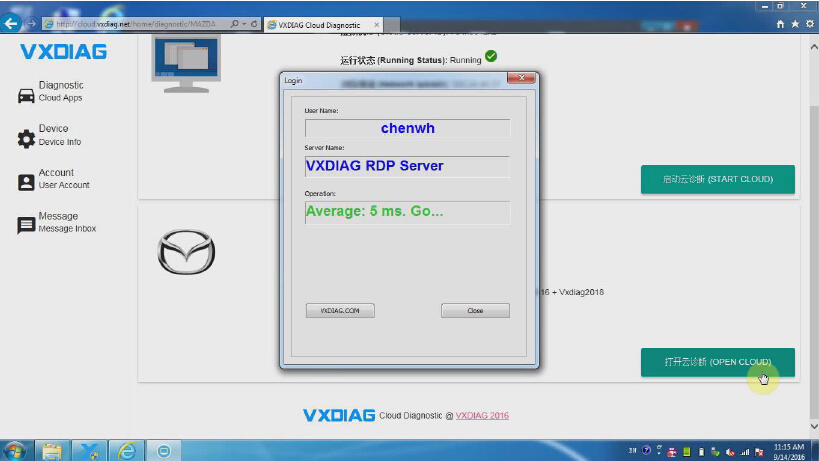
Click and open "start cloud diagnostics” will automatically open the default browser, enter the cloud diagnostics enter the dealer to the account and password;


4.Select the required models in the main interface Icon;


Select "Open Cloud diagnostics" and enter the cloud server(Note: to enter the cloud server must be connected to the device);


Here we take VXDIAG VCX NANO Mazda IDS software as an example


5.Open diagnostic software for vehicle diagnosis


How to use VXDIAG VCX NANO Cloud Diagnosis function? 
https://youtu.be/d1aT_E6pTyM