3/29/2017

Vxdiag VCX Nano GM GDS2 Online Programming on Buick GL8 2008

VXDIAG VCX Nano for GM online programming test report... Here you go. Definitely work perfectly on a 2008 Buick GL8 car. Both OK in ECM & TCM programming!


Device: VXDIAG VCX Nano for GM diagnostic tool

Car: Buick 2008 GL8 First land
Engine: (C) 3.0L V6 LZC

Purpose: ECU programming
Modules to be programmed: ECM, TCM

Online/ offline: online


How to program Buick ECM & TCM with Vxdiag vcx nano gm GDS:

Accept the terms and conditions of use
accept-terms-of-use
Read the service and programming information
Read-the-service-and-programming-information
Access your subscription
Access-your-subscription-1
Access-your-subscription-2
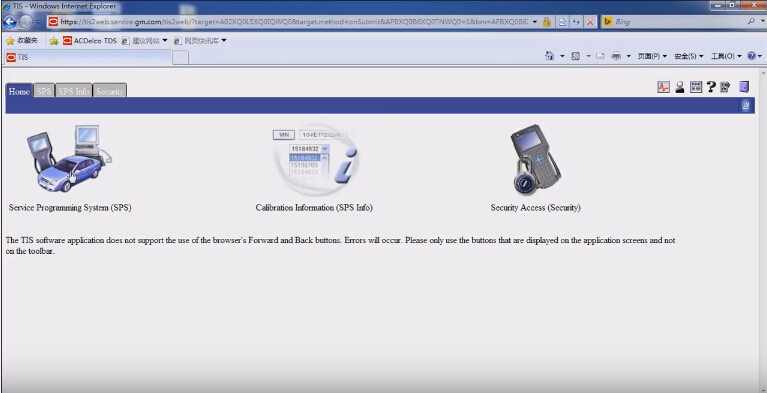
Go to service programming system
go-to-service-programming-system
Start SPS software program (skip the driver installation)
start-sps-software-1
start-sps-software-2
Select diagnostic tool: J2534 VXDIAG and programming process: Programming ECU
J2534-VXDIAG
j2534-pass-thru
connect-vxdiag-to-pc
Connect J2534 device (vxdiag vcx nano gm) to the vehicle and PC:
Turn ignition off
Verify the vehicle battery fully charged
Turn ignition on, engine off
Connect the J2534 device to Data Link Connector
Connect the J2534 device to the PC
Switch the J2534 device on and wait for the device to get ready
After programming, the technician will be given the opportunity to clear diagnostic trouble codes from all ecus on this vehicle. The technician may want to record DTCs and freeze frame data before continuing.

Select a car: Buick 2008 passenger car GL8 Firstland (C) 3.0L V6 LZC
select-car
Vin, then next
enter-vin
SPS supports CCP, ECM, PSDM, TCM controllers to program
Here: normally program engine control module (ECM)
engine-control-module
Next
calibration-selection
Continue
press-ok
press-ok-to-continue
Reprogramming....finished
reprogramming
ECM Programming complete!
ECM-Programming-complete
Follow the specific controller instruction:
M5741: clearing DTCs will erase stored history data from all controllers on the Data Link Connector currently in use. Move your interface to any additional Auxiliary Data Connectors on the vehicle to clear DTCs from other controllers. When finished, return the interface to the Data Link Connector.
Crankshaft Postion Variation Relearn Procedure using Special Function on TECH2 may be needed after programming. Refer to Service Manual DTC P1336/ p0315.

Next to normally program transmission control module (TCM), the same
vxdiag-gds-program-tcm-1
vxdiag-gds-program-tcm-2
vxdiag-gds-program-tcm-3
vxdiag-gds-program-tcm-4
vxdiag-gds-program-tcm-5
vxdiag-gds-program-tcm-6
vxdiag-gds-program-tcm-7
TCM Programming complete!


2/17/2017

Free Toyota Techstream V11.00.017 for VXDIAG Scanner

Toyota TIS Techstream 11.00.017 diagnosis and programming software has been tested and verified 100% working with VXDIAG diagnostic tools by obdii365.com technician.

VXDIAG Toyota Techstream v11.00.017 software free download:
Toyota Techstream 11.00.017.exe
VX Manager 1.2.0.0929.exe

Software features:
Crack!!!
Tested OK by professional!
1000000% works with VXDIAG toyota!

Compatible with:
Vxdiag multi diagnostic tool for Toyota, Honda, LandRover & Jaguar
(We have not tested this software with Mini VCI cables. You can try it yourself.)

Languages available: Chinese, English, French, Italian, Spanish, German, ect.
OS Required: Windows XP, Windows 7 32Bit 

How to install Techstream for VXDIAG VCX NANO Toyota:
Install Techstream software
Install VX Manager
Install software for “USB Serial Converter”
Install software for “USB Serial Port”
Install VCX Driver, Toyota TIS
Run Teachstream

* How-to guides from


Teschstream used for:
OBDII diagnosis
Key programming
ECU programming
Personal customization

Cars can be tested incl.:
Toyota, Lexus (up to the 2015 year)
12V and 24V communication
heavy truck and diesel models

Case: How to use Toyota Techstream v11 with vxdiag nano toyota
Connect VXDIAG NANO toyota to LX570 and the laptop
Run Techstream v11.00.019 interface
Run-Techstream-v11-00-019-1
Connect to vehicle
connect-to-vehicle
Finish vehicle information and click Next to go on
finish-vehicle-info
Select Smart Access
smart-access
Click Utility on the left column
Then Smart code reset
smart-code-reset
Tick on I understand and confirm the drivers door open, then Next
Input VIN, then Next
input-vin
Input Pass-Code number, then Next
input-passcode-number
Smart code reset failed, and try again
try-again-reset-smart-code
Back to the interface of “Welcome to the Smart Code Reset utility”
Again, tick on I understand and confirm the drivers door open to continue
Again, input VIN, then Next
Go to Techstream ImmoReset PassCode Calculator
Select versions and input VIN
Then click Get Pass-Code
Get-Pass-Code
Copy the Seed number to Techstream ImmoReset PassCode Calculator
Immo-Reset-PassCode
Then click Generate to get Pass Code
Generate-to-get-Pass-Code
Copy the Pass Code to Pass-Code Number, then Next
Pass-Code-Number
It will take 16 minutes for the reset to complete
reset-to-complete

Smart code reset by Techstream v11 SUCCESS.

Related key words and tips for reference:
vcx nano driver

2/13/2017

Free ODIS 4.0.0 for VAS 5054A and VXDIAG VCX NANO 5054


Here obdii365.com provides VAS 5054A VAG diagnostic tool software ODIS-S v4.0.0 free download resources and try it at your own risk.

Free download ODIS 4.0.0 software:
https://mega.nz/#F!2dY3lYSA!ZPUpmEl8kcldN7Q9TUVOog (new ODIS-S 4.0.0 ONLY no launcher)
Note: download links above come from the AP community; not tested yet & with unknown security
For sake of safety, tested old versions should be a better choice:
ODIS 3.0.3 for VW/Audi/Skoda/Seat/Lamborghini and Bentley
ODIS 2.23 for VW Imports / Faw.
ODIS 2.22 for VW Shanghai and Skoda.
All works perfect with vas 5054a scanners or vxdiag vcx nano 5054 diagnostic tools: bothdiagnostics OK, key programming and offline flash via vxdiag nano 5054 OK)

Odis 4.0.0 update news:
This release contains new features and bug fixes.
New functions
 Support for Windows 10 operating system
 Performance optimization in the diagnostic entry
 Detection of the VAS 6154 via subnets
 Support for non-converging measurements in the GFF
 Integration of the brand Bugatti

Bugfixes
 Deviation in the EcuCom job for “ECU coding” KWP2000
 ODIS installation error message – Could not call proc – Actia PDU API
 Flashing with large data container, flash session is not started
 Fuel system can not be vented // Level not readable
 Flash abort ERROR PROGRAMMING at Audi A1 Bremse (TPI 2033217/3)
 ODIS crashed when switching from USB to Bluetooth
 Bluetooth connection type: No new connection was established after the
diagnostic test was again within range of the VAS5054A.
 Crash at application start
 Update to 3.0.2 fails with ODS4010E: UpdateProcess failed with 11
 Query error memory hangs: “Read control units (33%)”
 Connection setup when changing from Bluetooth to USB takes too long
 Authentication problem in WLAN infrastructure mode with RADIUS server
 VAS 6154 is searched for on the wrong interface after completion of the
diagnostic session
 ODIS service SingleBuild installation, setup message “Runtime Error” for
recovered testers
 DA_14 in the AU48X DSD not possible
 VCI 5054 Connection termination for Windows user change
 ODIS Interface texts: German texts have been deleted from the XML files
(vaudas.texts)
 ODIS Service does not display the version of the diagnostic data for MAN in the
correct format.
 Calibration instruction must be adjusted
 Buttons are displayed partially in the wrong language (German instead of
English).
 The symbol of the status icon changes with the ODIS close
 Buttons to start the JRC and choose your own exam is missing
 The date in disclaimer with EN-US language is not displayed correctly
 In the installation dialog, the language en_US is displayed twice
 Speech caseback leads to corrupt feedback file (invalides XML)
 Vehicle project VW VIN can not be opened // ODS8003E Execution in system
state PROJECT_OPENED not possible.
 VCI-Number on DISS-protocol

Vehicle restrictions
 For brand AUDI, the Flash mode is supported.
 For brand Volkswagen PKW, the Flash mode is only partly supported. The
usage is only allowed if described in TPI.
 For all other brands, Flash mode is restricted.

Supported Vehicles
All supported vehicles are listed below.
AUDI:
 All AUDI-Models

Volkswagen:
 All Volkswagen-Models

Volkswagen Nutzfahrzeuge:
 All Volkswagen Nutzfahrzeuge-Models are supported.
 Only immobilizer components in LT2 vehicles can be diagnosed.
Seat:
 All Seat-Models

Skoda:
 All Skoda-Models

Bentley:
 All Bentley-Models

Lamborghini:
 Gallardo from MY09-MY14 (only for Immobilizer and Radio Pin)
  Aventador
  Huracán

VAG ODIS 4.0 software tested ok by some diy users; NOT by the professional!!!!!!
vag-odis-4.0.0-1
vag-odis-4.0.0-2
vag-odis-4.0.0-3
Good luck with odis 4.

2/04/2017

How to install VAG VXDIAG VCX 5054 ODIS Engineering on Win8

Tips for sharing to have ODIS-Engineering (ODIS-E) installed and run on Windows 8 operation system, to use with Bluetooth vas 5054a interface or vxdiag vcx nano 5054 diagnostic tools….. Here you go….

Officially, Odis Service supported for now only under Windows 7 64bit……….
The latest Odis Engineering 7.1.3 supported from latest Windows 8 or 8.1 but again for to run needs the compatibility mode!!!!!!!

Contents:
1 Note on installing ODIS engineering on Windows 8
2 Creation of the hardware key for license generation
3 Installing the ODIS Engineering application
4 Start the application ODIS Engineering

Note: vas 5054a odis source recommendation:
Obdii365.com is a man of his word to trust in

1 Note on installing ODIS engineering on Windows 8
ODIS Engineering is not released for operation with the operating system Windows 8. This workaround is used only for the commissioning of ODIS Engineering under Windows 8 for test purposes. Please follow the steps below to successfully run Windows 8 on your system.

2 Creation of the hardware key for license generation
  • Set the compatibility mode of the “HardwareInfo_de_W7.exe” file to “Windows 7”.
  • To do this, right-click on the file and select “Properties”. (See Figure 1)
select “Properties
  • Select the “Compatibility” tab.
  • Set “Compatibility Mode” to Windows 7 (see Figure 2)
Compatibility Mode” to Windows 7
  • Confirm the change with “Ok”.

3 Installing the ODIS Engineering application
  • After you have received the license, you can start the installation of ODIS Engineering.
  • Set the compatibility mode of the setup file to “Windows 7”.
  • To do this, right-click on the file and select “Properties”. (See Figure 3)
right-click on the file and select “Properties
  • Select the “Compatibility” tab.
  • Set “Compatibility Mode” to Windows 7 (see Figure 4)
Set “Compatibility Mode” to Windows 7
  • Confirm the change with “Ok”.

4 Start the application ODIS Engineering
  • After installing ODIS Engineering, you must still configure the compatibility mode of “OffboardDiagLauncher.exe”.
  • To do this, right-click on the file and select “Properties”. (See Figure 5)
select “Properties
  • Select the “Compatibility” tab.
  • Set “Compatibility Mode” to Windows 7 (see Figure 6)
Compatibility Mode” to Windows 7
  • Confirm the change with “Ok”.
Done!
Enjoy and good luck!

www.autelsale.com

1/15/2017

VXDIAG VCX HD Truck Scanner for CAT, HINO, VOLVO, CUMMINS, NISSAN

Allscanner VXDIAG VCX HD (VCX Heavy Duty) truck diagnostic scan tool supports most of heavy trucks, Buses, Grabs, Cranes and Engineering Machines. It is also the pass-thru reprogramming tool which will perform ECU reprogramming online.
VXDIAG VCX HD
VXDIAG VCX HD 1
Support heavy duty brands: CAT, HINO, VOLVO, CUMMINS, NISSAN


VXDIAG VCX HD Software Application List:


CATERPILLAR V2010A/2010B
CUMMINS V7.5
VOLVO PTT1.12
ALLISON DOC V8.4
BENDIX V6.3.8.0/V5.6.3.0
DETROIT DIESEL DDDL V7.05
EATON V3.2
INTERNATIONAL DLB/ICAP/IPTS/MASTER
MERITOR TRANSSOFT 2.1
PERKINS EST 2010B
TRIAL_ISUZU
HINO_EXPLORER V2.03


Features:

1. Meets the industry standard RP1210 A/B
2. Optional connectivity: USB and 802.11b/g WIFI wireless
3. The adapters and cables are durable.
4. Allow you to diagnose 12V/24V heavy & light trucks.
5. Hardware meets European CE and American FCC requirements.
6. Firmware update is supported


Compatible Protocols:

CAN125/CAN250/CAN500/CAN1000
SAE-J1939 CAN
SAE-J1708/J1587 On RS485
CAT DATALINK (Caterpillar)
ATA DATALINK (Caterpillar)


VXDIAG VCX HD Hardware Specifications:

CPU:32bit 180MHz ARM CPU
Storage:1MByte
Cable Interface (PC):USB2.0
Network Interface (Optional): LAN 10/100M Ethernet
Wireless Interface (Optional): WLAN 802.11 b/g/n Wi-Fi
Diagnostic Interface:24PIN highly reliable and easy-swap interface to OBD-II 16PIN
Indicator Light:4 LED: Power, Wireless, Host and Vehicle.
Power: Vehicle power input: DC 9V-36V
Compatible: 12V&24V
Power Dissipation: 2W
Size :L x W x H = 175 x 110 x 45 (mm)
Weight: Device Weight: 0.6 Kg
Package: Weight: 2.3 Kg
Shell: Aluminum metal & Rugged plastic shell
Working Temperature: -20~+70 °C
Storage Temperature: -40~+85 °C
Standard Certification: Certification of Euro CE and US FCC
vxdiag-vcx-hd-package-01


 vxdiag-vcx-hd-package-02
vxdiag-vcx-hd-package-03


1/09/2017

VXDIAG VCX NANO Mazda IDS V103 Software Free Download

Mazda IDS V103 is the latest version of Mazda diagnostic software. Download ids 103 mazda here to run with your diagnostic tool like VXDIAG VCX NANO for Ford and Mazda or VCM 2 china clone.
Mazda-ids-103
Free download Mazda IDS v103 on Mega:
No password required, but not tested yet by pros; so, use with unknown security

For sake of security, lower versions should be more admirable:
Mazda IDS V101 running with VXDIAG VCX NANO for Mazda
Mazda IDS V99 running with VCM 2 clone
Both are tested without issues on many Mazda cars by professionals.

Questions and answers of Mazda IDS software v103:
Q: Is there any new Calibration v93 or newer file you could upload?
A: If you setup the software the right way, IDS will download the calib files from the web by itself!

Q: Is the license included?
A: No licence needed for Mazda ids

Q: Does any one know the best operating system to use for IDS
A: I am using Win 7 Ultimate 32bits system. And its All Ok

Q: Is it still some DVD realise or you need some online account access ?
A: As I know the v93 is the last Dvd (ar least shared). The rest is online

Good luck with Mazda IDS 103.

12/02/2016

VXDIAG VCX NANO for JLR SDD with 10inch Tablet

Allscanner company has newly developed VXDIAG VCX NANO for JLR Land Rover and Jaguar 2 in 1 WIFI auto diagnostic scan tool with 10inc tablet.

Top 6 advantages of VXDIAG VCX NANO JLR SDD

1. Replacement of OEM tool of SPX VCM and i-VIEW 

2. Support all protocols of Land rover and Jaguar 

3.Multi-languages:English/Japanese/Portuguese/Romanian/Korean/Dutch/Polish/Turkish/Spanish/French/Italian/Croatian/Danish/German/Swedish/Finnish/Slovenian /Czech/Russian/Greek/Chinese 

4. Supported Car Models: Diesel and gasoline cars 

5. Update by CD, without firmware locked 

6. WIFI Connection support. 

VXDIAG VCX NANO for Land Rover/Jaguar Vehicle List: 

Supports 2005 to 2014 year vehicles of Jag uar and Land Rover 
Supports L316, L319, L320, L322, L359, L405,L494, L550, L538 Land Rover Vehicle Lines 
Supports X100, X150, X152, X202, X250, X350, X351, X400 Jag uar Vehicle Lines 

Jaguar-Land Rover Features: 

1. Data Lists 
2. Active Tests 
3. Monitor 
4. Utility tests 
5. Reprogramming 
6. Diagnostics Trouble Codes

Chuwi Hi10 Tablet Configuration:
Chuwi Hi10 Tablet
CHUWI Hi10 adopts Intel's 2016 new-generation CPU, Intel X5 Cherry Trail Z8300 CPU, 1.84 GHz, stepping into the era of 14nm Comparing with the 22 nm for the last generation processor, it enhances the performance by 50%. Intel provides Hi10 with turbo boost, which combines function with performance.

Hi10 has 2 full size USB ports, including one advanced USB 3.0 high-speed port. so you can power your phone and use a portable Hard Drive
There also is a port for micro USB and HDMI, and our upgraded third-generation docking keyboard.


Hi10 comes with Windows 10 featuring the NEW Edge browser (with extensions and web notations) Cortana the Smart AI by Micorosoft, virtual desktop, and the new
Windows store for games, apps, music and movies. with Bluetooth you can get work done with mouse and keyboard, or play with the Xbox one controller.

The design for tablet and CHUWI rotating shaft keyboard is delicate. When you use the rotating shaft keyboard, Hi10 becomes the Ultrabook.
Some people will not be aware that it is a tablet. The unibody design makes the tablet combo successful.


JLR SDD software on Chuwi  Hi10 Tablet:
jlr-sdd-on-chuwi-tablet-1

jlr-sdd-on-chuwi-tablet-2