1/15/2017

VXDIAG VCX HD Truck Scanner for CAT, HINO, VOLVO, CUMMINS, NISSAN

Allscanner VXDIAG VCX HD (VCX Heavy Duty) truck diagnostic scan tool supports most of heavy trucks, Buses, Grabs, Cranes and Engineering Machines. It is also the pass-thru reprogramming tool which will perform ECU reprogramming online.
VXDIAG VCX HD
VXDIAG VCX HD 1
Support heavy duty brands: CAT, HINO, VOLVO, CUMMINS, NISSAN


VXDIAG VCX HD Software Application List:


CATERPILLAR V2010A/2010B
CUMMINS V7.5
VOLVO PTT1.12
ALLISON DOC V8.4
BENDIX V6.3.8.0/V5.6.3.0
DETROIT DIESEL DDDL V7.05
EATON V3.2
INTERNATIONAL DLB/ICAP/IPTS/MASTER
MERITOR TRANSSOFT 2.1
PERKINS EST 2010B
TRIAL_ISUZU
HINO_EXPLORER V2.03


Features:

1. Meets the industry standard RP1210 A/B
2. Optional connectivity: USB and 802.11b/g WIFI wireless
3. The adapters and cables are durable.
4. Allow you to diagnose 12V/24V heavy & light trucks.
5. Hardware meets European CE and American FCC requirements.
6. Firmware update is supported


Compatible Protocols:

CAN125/CAN250/CAN500/CAN1000
SAE-J1939 CAN
SAE-J1708/J1587 On RS485
CAT DATALINK (Caterpillar)
ATA DATALINK (Caterpillar)


VXDIAG VCX HD Hardware Specifications:

CPU:32bit 180MHz ARM CPU
Storage:1MByte
Cable Interface (PC):USB2.0
Network Interface (Optional): LAN 10/100M Ethernet
Wireless Interface (Optional): WLAN 802.11 b/g/n Wi-Fi
Diagnostic Interface:24PIN highly reliable and easy-swap interface to OBD-II 16PIN
Indicator Light:4 LED: Power, Wireless, Host and Vehicle.
Power: Vehicle power input: DC 9V-36V
Compatible: 12V&24V
Power Dissipation: 2W
Size :L x W x H = 175 x 110 x 45 (mm)
Weight: Device Weight: 0.6 Kg
Package: Weight: 2.3 Kg
Shell: Aluminum metal & Rugged plastic shell
Working Temperature: -20~+70 °C
Storage Temperature: -40~+85 °C
Standard Certification: Certification of Euro CE and US FCC
vxdiag-vcx-hd-package-01


 vxdiag-vcx-hd-package-02
vxdiag-vcx-hd-package-03


1/09/2017

VXDIAG VCX NANO Mazda IDS V103 Software Free Download

Mazda IDS V103 is the latest version of Mazda diagnostic software. Download ids 103 mazda here to run with your diagnostic tool like VXDIAG VCX NANO for Ford and Mazda or VCM 2 china clone.
Mazda-ids-103
Free download Mazda IDS v103 on Mega:
No password required, but not tested yet by pros; so, use with unknown security

For sake of security, lower versions should be more admirable:
Mazda IDS V101 running with VXDIAG VCX NANO for Mazda
Mazda IDS V99 running with VCM 2 clone
Both are tested without issues on many Mazda cars by professionals.

Questions and answers of Mazda IDS software v103:
Q: Is there any new Calibration v93 or newer file you could upload?
A: If you setup the software the right way, IDS will download the calib files from the web by itself!

Q: Is the license included?
A: No licence needed for Mazda ids

Q: Does any one know the best operating system to use for IDS
A: I am using Win 7 Ultimate 32bits system. And its All Ok

Q: Is it still some DVD realise or you need some online account access ?
A: As I know the v93 is the last Dvd (ar least shared). The rest is online

Good luck with Mazda IDS 103.

12/02/2016

VXDIAG VCX NANO for JLR SDD with 10inch Tablet

Allscanner company has newly developed VXDIAG VCX NANO for JLR Land Rover and Jaguar 2 in 1 WIFI auto diagnostic scan tool with 10inc tablet.

Top 6 advantages of VXDIAG VCX NANO JLR SDD

1. Replacement of OEM tool of SPX VCM and i-VIEW 

2. Support all protocols of Land rover and Jaguar 

3.Multi-languages:English/Japanese/Portuguese/Romanian/Korean/Dutch/Polish/Turkish/Spanish/French/Italian/Croatian/Danish/German/Swedish/Finnish/Slovenian /Czech/Russian/Greek/Chinese 

4. Supported Car Models: Diesel and gasoline cars 

5. Update by CD, without firmware locked 

6. WIFI Connection support. 

VXDIAG VCX NANO for Land Rover/Jaguar Vehicle List: 

Supports 2005 to 2014 year vehicles of Jag uar and Land Rover 
Supports L316, L319, L320, L322, L359, L405,L494, L550, L538 Land Rover Vehicle Lines 
Supports X100, X150, X152, X202, X250, X350, X351, X400 Jag uar Vehicle Lines 

Jaguar-Land Rover Features: 

1. Data Lists 
2. Active Tests 
3. Monitor 
4. Utility tests 
5. Reprogramming 
6. Diagnostics Trouble Codes

Chuwi Hi10 Tablet Configuration:
Chuwi Hi10 Tablet
CHUWI Hi10 adopts Intel's 2016 new-generation CPU, Intel X5 Cherry Trail Z8300 CPU, 1.84 GHz, stepping into the era of 14nm Comparing with the 22 nm for the last generation processor, it enhances the performance by 50%. Intel provides Hi10 with turbo boost, which combines function with performance.

Hi10 has 2 full size USB ports, including one advanced USB 3.0 high-speed port. so you can power your phone and use a portable Hard Drive
There also is a port for micro USB and HDMI, and our upgraded third-generation docking keyboard.


Hi10 comes with Windows 10 featuring the NEW Edge browser (with extensions and web notations) Cortana the Smart AI by Micorosoft, virtual desktop, and the new
Windows store for games, apps, music and movies. with Bluetooth you can get work done with mouse and keyboard, or play with the Xbox one controller.

The design for tablet and CHUWI rotating shaft keyboard is delicate. When you use the rotating shaft keyboard, Hi10 becomes the Ultrabook.
Some people will not be aware that it is a tablet. The unibody design makes the tablet combo successful.


JLR SDD software on Chuwi  Hi10 Tablet:
jlr-sdd-on-chuwi-tablet-1

jlr-sdd-on-chuwi-tablet-2

10/14/2016

How to install VXDIAG VCX NANO JLR SDD V145 on Win7

VXDIAG VCX NANO Jaguar and Land rover diagnostic software has newly updated to V145 offline programming version.


Software version: V145
Operating system: Windows 7 32-bit

Compatible device: VXDIAG VCX NANO for JLR WiFi/USB interface

Free download JLR SDD V145 software & patch
Note:
JLR SDD V145 installation warning:
1. After install SDD software successfully, connect computer to network and then install patch(the patch is key to activate offline account. Do not forget to install the patch!)
2.After activate software, disable network connection!!!
3.If SDD runs ok, install freeze DFStd software.
If you did not install the freeze software within one day, software will expire within one day.Solution is to reboot the computer, enter the computer BIOS settings, reset the computer date/time to the date before the trial period.
Take Dell D630 laptop as an example, press “Power” button then F2 button, to enter BIOS-Date/Time,reset the data time.
4.JLR SDD V145 is offline trail version. If you connect to network after software activation, you do not have the one-day trial.
JLR SDD V145 1

JLR SDD V145 2

JLR SDD V145

How to install VXDIAG VCX NANO JLR SDD Part I
(Video for VXDIAG VCX NANO for Jaguar and Land rover USB/Wifi inetrface)
How to install VXDIAG VCX NANO JLR SDD Part II

10/13/2016

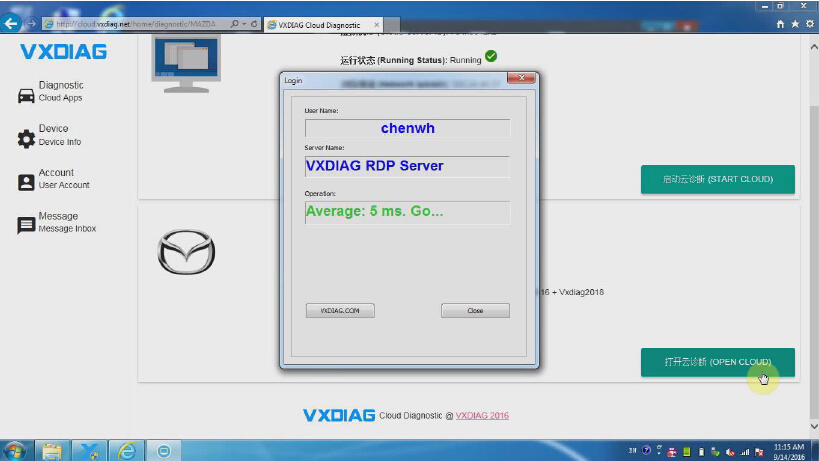
How to set up VXDIAG VCX NANO Cloud Diagnosis

VXDIAG VCX NANO series scanners (Ford/Mazda IDS, GM/Opel GDS2,JLR SDD,VAG ODIS,Toyota Techstream) has developed "Cloud Diagnosis" function without installing software.


What is Cloud Diagnosis?
-That means you do not need to install the software, you just need to install the VX Manger, then you can start to do the diagnosis!


Operating system:

Recommended using Microsoft WIN7 or higher system. Computers are required to

install the Microsoft IE11 or Google browser. Android and IOS systems are not supported


How to set up VXIDAG Cloud Diagnosis?


1.Installation of VXDIAG device driver management“VX MANAGER";


Accept license agreement


Here nothing to choose, directly click on "NEXT" go down:


2.Connected to the VXDIAG diagnostic equipment, the computer automatically install the driver;


3.The driver installed after open the "VX MANAGER", select the top menu VX CLOUD";


Click and open "start cloud diagnostics” will automatically open the default browser, enter the cloud diagnostics enter the dealer to the account and password;


4.Select the required models in the main interface Icon;


Select "Open Cloud diagnostics" and enter the cloud server(Note: to enter the cloud server must be connected to the device);


Here we take VXDIAG VCX NANO Mazda IDS software as an example


5.Open diagnostic software for vehicle diagnosis


How to use VXDIAG VCX NANO Cloud Diagnosis function? 
https://youtu.be/d1aT_E6pTyM 

9/07/2016

VXDIAG VCX NANO Toyota V11.20.019 support ECU Programming

Toyota Techstream new version 11.20.019 has released. Here is the free download resource of Toyota Techstream V11.20.019, which enhances and adds a lot in functions like health check (diagnosis), customize setting, ecu programming and CAN BUS for many models.
toyota-techstream-tis-v11-20-019-1
Free download Techstream:
Techstream 11.20.019 – newest but unknown security

Techstream TIS 10.30.029 – without issues, safe
Toyota Teachstream V11.20.019 Update Info
CategoryVehicleSystemFunctionContent
Vehicle Coverage–––Covered all the models by October 2016.
New FunctionsPRIUS PHVDC Quick Charging Control–Added new system “DC Quick Charging Control”.
RAV4, etc.TelematicsID Information DisplayAdded new Utility “ID Information Display”.Description:This function displays the identification information of Telematics ECU.
PRIUS PHVAir ConditionerMiddle Differential Pressure Valve State CheckAdded new Utility “Middle Differential Pressure Valve State Check”.Description:This function is used to confirm the state of Middle Differential Pressure Valve.
PRIUS PHVAir ConditionerRefrigerant Filling ModeAdded new Utility “Refrigerant Filling Mode”.Description:This function is used to enter the Refrigerant Filling Mode.
PRIUS PHVHybrid ControlEV Mode Cruising Range ResetAdded new Utility “EV Mode Cruising Range Reset”.Description:This function is used to reset the cruising range for EV mode.
PRIUS PHVHV BatteryHybrid Battery Thermal Keep Control Mode SettingAdded new Utility “Hybrid Battery Thermal Keep Control Mode Setting”.Description:This function sets Hybrid Battery Thermal Keep Control Mode when a vehicle is sold in an extremely cold region.
Functional ImprovementPRIUS, etcHybrid ControlHV BatteryMotor GeneratorFreeze Frame DataAdded FFD Filter function.
–EngineActivetestChanged display text of Information of “TC Terminal” to “This test activates the TC and TE1 terminal ON/OFF.”.
LS, LX, GS, ES, RX, IS, LC, PRIUS, etcRain SensorCAN Bus CheckModified the System Name of CAN Bus Check from “Rain Sensor” to “Rain and/or Humidity Sensor”.
LS, LX, GS, ES, RX, IS, LC, PRIUS, etcRain SensorSystem Selection MenuModified the System Name of System Selection Menu from “Rain Sensor” to “Rain and/or Humidity Sensor”.
AURIS NRECROWN ARSGS350 GRL(2GR-FKS)IS200t ASENX200t AGZPRIUS ZVW5RC200t ASCRX200t AGLGS350 GRL(2GR-FSE) is inapplicable.EngineFuel ConsumptionDeleted “Injection Volume” displayed items on Fuel Consumption.
CROWN ARSGS350 GRL(2GR-FKS)IS200t ASENX200t AGZRC200t ASCRX200t AGLGS350 GRL(2GR-FSE) is inapplicable.EngineActivetestAdd display text of Information.D-4S (A/F Control)D-4S (Fuel Cut)D-4S (Injection Volume)AddWhen High Fuel Pressure Value is too high, it may prevent switching to Direct injection.Continuous long Port injection raises the fuel temperature due to the heat of the engine, resulting in the increase of High Fuel Pressure Value.Switch to Direct injection by driving the vehicle to lower the High Fuel Pressure Value.Please increase The Engine load as running an Air Conditioner and loading electric if Direct injection is not changed from Port injection.
Bug FixRXBack DoorDataListCustomizeFixed the bug;Data monitor / customize revised the problem which was not displayed by emblem sensor non-installation vehicle.

Note:
ECU programming function via Techstream only can be performed on VXDIAG VCX NANO for Toyota;
Xhorse Mini VCI cable can only do some easy diagnosis and customize setting, but not ecu programming.

toyota-techstream-tis-v11-20-019-2
toyota-techstream-tis-v11-20-019-3
toyota-techstream-tis-v11-20-019-4
toyota-techstream-tis-v11-20-019-5
Software requires activation. If you need the activation/registration/license code, please contact Mr.autokent in autoprofessionals.org forum.

9/01/2016

VXDIAG JLR SDD CopySessions.exe-System Error

Here is the solution to VXDIAG VCX NANO JLR SDD installation error.

Problem:
When I install Jaguar and Land Rover SDD V141 software for VXDIAG VCX NANO interface, i had error "CopySessions.exe-System Error.
Unable to start the program because MFC71.DLL is not present on the computer.
To solve the problem, try reinstalling the program."
vxdiag-jlr-sdd-error-1

vxdiag-jlr-sdd-error-2

vxdiag-jlr-sdd-error-3

vxdiag-jlr-sdd-error-4

vxdiag-jlr-sdd-error-5

Possible reason:
You have installed JLR SDD on windows 8 operating system. VXDIAG JLR SDD can be installed on Windows XP and Windows 7 only.


Solution:
Re-install your SDD on WINXP or WIN7 laptop.


How to Install VXDIAG VCX NANO JLR SDD143 Software:
https://www.youtube.com/watch?v=-NVVy_Ua7xY