Showing posts with label Subaru SSM4. Show all posts

2/08/2022

Download V2022.01 VXDIAG Subaru SSM3 & SSM4 Software

 The Subaru factory diagnostic tool costs thousands. The VxDiag Subaru is the perfect alternative and it helps you out. It is much cheaper than Subaru's real deal. The 2022 version software has been tested and verified working without issue by obdii365.com technician.


Software version:

  • SSM3 2021.01;
  • SSM4 V28.6.0;
  • FlashWrite2 V1.3.9
  • Subaru Patch

V2022.01 VXDIAG Subaru SSM3 & SSM4  1

Operating system:

  • Windows 7
  • Windows 8
  • Windows 10

Compatible device: 

Language:

  • SSM3 Language: English, German, Spanish, French, Italian
  • SSM4 Language: English, Japanese, French, German, Spanish, Italian, Russian, Chinese, Polish


Free Download VXDIAG Subaru SSM3 SSM4 2022.01 Software

https://mega.nz/folder/ucIEhR7J#QUGAbagyLLsCslE585Fu2Q/folder/KcIiBThY

Contains: SSM3 2022.1; SSM4 V28.60; FlashWrite2

Free Download Subaru SSM4 Patch (MUST INSTALL PATCH)

https://mega.nz/folder/zJASHJ6b#FgXQQluqoFyVSKkQ2k5KMw


SSM3 V2022.01

V2022.01 VXDIAG Subaru SSM3 & SSM4  2

V2022.01 VXDIAG Subaru SSM3 & SSM4 3

SSM4 V28.6.0

V2022.01 VXDIAG Subaru SSM3 & SSM4 4

Installation Steps:

Install FlashWrite setup

Install SSM3 setup

Install SSM4 setup

Install VX Manager

Run Patch


Software installation guide is the same as the previous 2020 version, check

https://youtu.be/1eVAQ_NNMeY

SSM3 does not require activation, SSM4 28.6.0 and later version does.

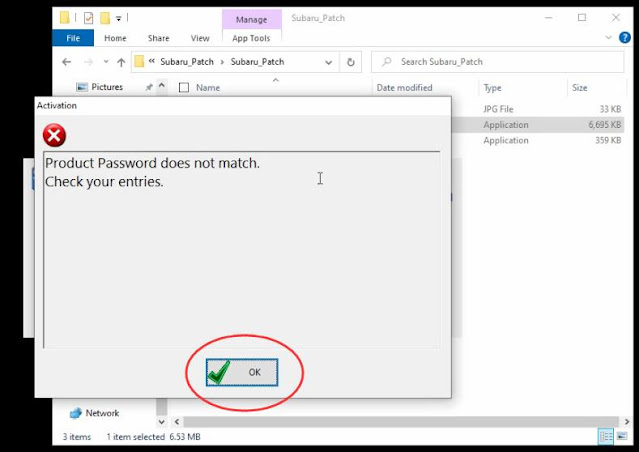
When run SSM4 from patch, it says the product password does not match.

activate vxdiag subaru ssm4 1

activate vxdiag subaru ssm4 2

Press OK will bring you a dialog below

Copy Product ID

activate vxdiag subaru ssm4 3

Run SubaruID program, paste Product ID here

activate vxdiag subaru ssm4 4

Run SSM4 from patch again. Software is ready to use.


http://blog.obdii365.com/2022/02/09/download-install-and-activate-v2022-01-vxdiag-subaru-ssm3-ssm4/

1/05/2021

2020.7 VXDIAG Subaru SSM3 SSM4 FlashWrite Installation

 How-to’s: install SSM III 2020.07 +  SSM IV V22.6.0 + FlashWrite2 V1.3.4 Subaru Select Monitor software for VXDIAG Subaru diagnostic tool.


SSM3, SSM4 software and Patch can be downloaded free from previous post here:

Free Download Subaru SSM3 SSM4 V2020.7 Software and Patch


How to install Subaru SSM3 SSM4 and Patch?

Step 1: Install FlashWrite setup

install-2020-07-subaru-ssm3-ssm4-1


Download, copy and Paste Subaru 2020.7 software folder to desktop

install-2020-07-subaru-ssm3-ssm4-2


Open FlashWrite2 EU V1.3.4 setup on FlashWrite2 folder
Install FlashWrite2 setup
Accept license agreement

install-2020-07-subaru-ssm3-ssm4-3


Press Install

Finish install FlashWrite2 setup


Step 2: Install Subaru SSM3 Setup

Open SSM3 folder

install-2020-07-subaru-ssm3-ssm4-4


Install Setup
Accept license agreement

install-2020-07-subaru-ssm3-ssm4-5


Click the left icon to start setup
Installing diagnosis software

install-2020-07-subaru-ssm3-ssm4-6


verify windows security warning, select Install this driver software anyway

install-2020-07-subaru-ssm3-ssm4-7


PC application installation was successful.


Step 3: Install SSM4 Setup

Open SSM4 folder

install-2020-07-subaru-ssm3-ssm4-8


Install SSM4_EU_V22.6.0 setup
Install wizard for Subaru Select Monitor 4, press Next
Accept license agreement

install-2020-07-subaru-ssm3-ssm4-9


Press Install

install-2020-07-subaru-ssm3-ssm4-10


Finish installing SSM4 setup


Step 4: Install VX Manager

install-2020-07-subaru-ssm3-ssm4-11


Install VX Manager driver

install-2020-07-subaru-ssm3-ssm4-12


Select Subaru-SSM software to install, press Next

Finish install VX Manager


Step 5: Run Patch

Connect vxdiag subaru with computer

install-2020-07-subaru-ssm3-ssm4-13


Install device driver software
Open PATCH folder, copy and paste Subaru patch to desktop

install-2020-07-subaru-ssm3-ssm4-14


Run Subaru patch on desktop as Administrator

install-2020-07-subaru-ssm3-ssm4-15


Is SSM3 prompt license expiration information, don’t worry, you can renew your license by provide S/N number to vxdiag engineer

install-2020-07-subaru-ssm3-ssm4-16


Select Region

install-2020-07-subaru-ssm3-ssm4-17
Now Software is ready to use.


Video reference:


www.obdii365.com

http://blog.obdii365.com/2021/01/05/install-2020-7-vxdiag-subaru-ssm3-ssm4-flashwrite/