Allscanner company has developed VXIDAG Multi Too and VXDIAG VCX NANO series scanner for Honda,Toyota,GM,JLR,Ford,Mazda,Subaru, Porsche and VAG.
VXDIAG software can be downloaded free here:
1. https://mega.nz/#!UU8VXKbA!O8ibp-syZzPcc99vthyhGRoQ3lUQpUHYb74d9omK_1A Ford IDS v98 VM.rar
2.http://pan.baidu.com/s/1nudXDvr Ford IDS v95 VM CN.rar
3.http://pan.baidu.com/s/1pK5kBSf Ford IDS v95 VM
4.http://pan.baidu.com/s/1bnOVNS7 MAZDA IDS v95 VM
5.http://pan.baidu.com/s/1c1beYa8 MAZDA IDS v95 VM CN.rar
6.Mazda IDS v98.rar
https://mega.nz/#!NVEUWaZQ!AzKBuNHBzie8RrUnDKO-2xfPz6q_YmkjwQQ1jiRZqzE
7.Toyota Techstream_Setup_V10.10.018.exe 133.1 MB
https://mega.nz/#!UI80RbKJ!LdKDYzuviW1DyqMXDgOl8vld1ijRHbhNeMb8TaZmV40
8.Subaru_10_2015_DVD_FULL.iso 1.82 GB
https://mega.nz/#!BA0hhSTJ!ZdlfudXiluSLbAXcP4axIS-M9-fbx6nWD4xE354tMAc SSM2015.10
9.GM.7z 1.28 GB(OLD-edition)
https://mega.nz/#!QV8R0JYB!FeUrlUy5i9oxr2FJrV6ll8Vb7p23DzaA2txMAhk9f-Y
10.HDS_3014_011.rar 886.8 MB
https://mega.nz/#!tUUwwC7Y!RZHIDh-tHVnIQqxumfvT1vBZb0mqatwnFq8x_M521zE
11.Ford IDS v86.rar 353.7 MB
https://mega.nz/#!YR0TkKbI!IceZeZAtA2fwAJMu01uzT1abBY3m1v8hBwHjwcx-9go
12.VAS-PC-V19-EN5054.rar 3.48 GB
https://mega.nz/#!VMkRSJzI!hHCkAr1uJs799tTOfKlGJ6DHD8_5yVYl_j--fPwWtK0
13.Mazda IDS v99.00.rar 451.6 MB
https://mega.nz/#!IUl21D5R!371jDlVdMdi6ePvjeVZoEvpC7Wc2Oe2_PZ8C4RylSP8
14.Tech2Win 2016.02.24.rar 138.9 MB
https://mega.nz/#!QI0j3ACS!XBAFZWEFPhQ3A9MtyPYfT1wojVgB1sEmt2T62nrmQcM
15.GDS2 V15 all-data VM.rar 1.95 GB
https://mega.nz/#!VMEz0LKD!yCY-3tCQavZSAWFq3AcBlzM2Zv6a0K7wjKEdScXv36o
16.Ford IDS v98 VM CN.rar 1.53 GB
https://mega.nz/#!wdVEWBIb!i4GWM4-zzqG1eXt8p2fGGbwUc7GLk5S2stNmK9-zPoc
17.Mazda IDS v100.00.rar 404.7 MB
https://mega.nz/#!5VEXmIjL!qr4QEP1YBH4IBuT1WaSmn7-SF2S6954_paYJqpHmjds
18.Subaru_01_2015.rar 712.2 MB
https://mega.nz/#!5YcnXBiC!ipnGmoe1i5ZJZxxr04sXn08TxH7cE-7DApELvHbxXB4
19.JLR SDD V145
https://mega.nz/#F!o5c0wDxT!nUAfvdex-tGRC796VCsvgw
20.FORD V100 EN/CN
https://mega.nz/#F!9wRz1Bha!WAs4sDRy4sqhyJLtQnTyiA
21.ODIS 3.03
https://mega.nz/#F!UkwAXApa!EBmLdvbNFarPOPjpjX3GzA


8/04/2016
VXDIAG VCX NANO 5054 ODIS 3.0.3 Installation
The latest ODIS 3.0.3+ Postsetup 9.3.10 diagnostic software for VAG group VW Audi Skoda Seat Bentley Lamborghini has been verified working great with VXDIAG VCX NANO 5054 WiFi version interface. Here is the tutorial on ODIS-Service 3.0.3 installation on Windows 7 (both 32-bit and 64-bit).
Basic info:
– software version: ODIS 3.0.3 Postsetup 9.3.10
– O.S.: Windows 7 system
– connection WIFI / USB
– Better than VAS 5054A
VAG ODIS 3.0.3 installation instruction:
1 run OffboardDiagnosticSetup-Service_3_0_3 application and install ODIS 3.0.3
(license in license.dat)


2 replace OffboardFiagLaunch application in disk C: with that in ODIS 3.0.3 disk F:

3 run ODIS 3.0.3 on Desktop and setup Postsetup 9.3.10 (about 1 hour)

Enter PostSetup user name (default: abc) and keyword (default:123)

Select Setup language


4 softing vehicle interface setup: VAS5054

5 run ODIS 3.0.3 for Diagnosis on 3C Passat sedan 2007


8/01/2016
VXDIAG VCX NANO ODIS 3.0.3 tested on Passat 3C
Obd365 technicians has managed to test the new WiFi VXDIAG VCX NANO 5054 ODIS can perform diagnosis in on a Passat 2007. For more test reports, please go on reading.
Tool tested with: new VXDIAG VCX NANO 5054 (wifi version)

Software version: ODIS-Service 3.0.3 Postsetup 9.3.10 (latest)

Vehicle tested: 2007 Volkswagen Passat sedan 3C
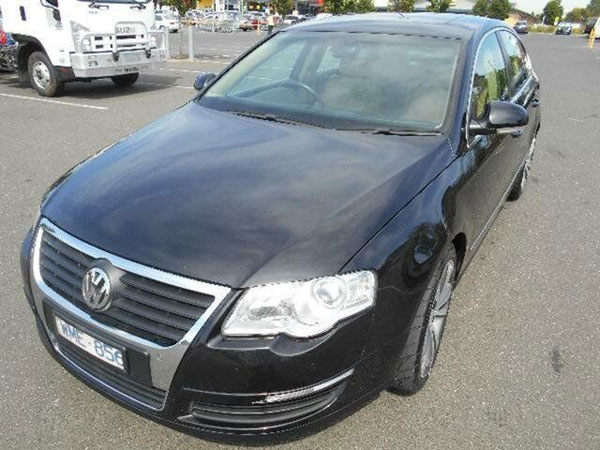

ODIS 3.0.3 Test result:
NOTE:
The technician test it on WINDOWS 7 32 bits (WIN 7 64 bits also ok)
System C: // have to be NTFS format
C: // need to have at least 40GB space for installing ODIS
Manage to read/clear faults and some other diagnosis on this Passat
Some screenshots here:


ODIS 3.0.3 tested ok!
It’s verified that VW Audi VAG ODIS 3.0.3 has improved a lot compared with ODIS 3.0.1:
– Estimated remaining times are shown for ECU flash operations.
– Diagnostic protocol contains interruptions of GFF sessions, extended measurement values, improved ECU communication view,
used diagnostic hardware, connection type of diagnostic hardware, operating system, the hotfix used and submissions of support requests
– The measured value display has been improved.
– Documents in GFF are displayed in separate windows.
– One message box will be shown at the beginning of the test drive mode.
– GFF hotfixes can be integrated during diagnostic sessions.
– Danger messages have been revised.
– Stopping of diagnostic sessions may be interrupted.
– Automatic deletion of autosave diagnostic protocols after successful transmission.
– Selection of PassThru diagnostic hardware has been improved.
– ODIS Service Software update has been stabilized.
ODIS 3.0.3 can work with VXDIAG VCX NANO WIFI version and technicians at obdii365 will also test on VAS 5054A and 5054 plus. Test reports will be updated here...
Tool tested with: new VXDIAG VCX NANO 5054 (wifi version)


ODIS 3.0.3 Test result:
NOTE:
The technician test it on WINDOWS 7 32 bits (WIN 7 64 bits also ok)
System C: // have to be NTFS format
C: // need to have at least 40GB space for installing ODIS
Manage to read/clear faults and some other diagnosis on this Passat
Some screenshots here:


ODIS 3.0.3 tested ok!
It’s verified that VW Audi VAG ODIS 3.0.3 has improved a lot compared with ODIS 3.0.1:
– Estimated remaining times are shown for ECU flash operations.
– Diagnostic protocol contains interruptions of GFF sessions, extended measurement values, improved ECU communication view,
used diagnostic hardware, connection type of diagnostic hardware, operating system, the hotfix used and submissions of support requests
– The measured value display has been improved.
– Documents in GFF are displayed in separate windows.
– One message box will be shown at the beginning of the test drive mode.
– GFF hotfixes can be integrated during diagnostic sessions.
– Danger messages have been revised.
– Stopping of diagnostic sessions may be interrupted.
– Automatic deletion of autosave diagnostic protocols after successful transmission.
– Selection of PassThru diagnostic hardware has been improved.
– ODIS Service Software update has been stabilized.
ODIS 3.0.3 can work with VXDIAG VCX NANO WIFI version and technicians at obdii365 will also test on VAS 5054A and 5054 plus. Test reports will be updated here...
7/28/2016
VXDIAG VCX NANO ODIS V3.03 replace VAS 5054A
VXDIAG VCX NANO 5054a with ODIS v3.0.3 diagnostic scanner for Volkswagen Group VW Audi Skoda Seat Bentley Lamborghini is verified working.
Software version: ODIS V3.0.3
Top feature:
1. Replacement of OEM VAS 5054A
2. Support UDS Protocol
3.Multi-languages: English/Japanese/Portuguese/Romanian/Korean/Dutch/Polish/Turkish/Spanish/ French/Italian/Croatian/Danish/German/Swedish/Finnish/Slovenian/Czech/Russian/Greek/Chinese
4. Supported Car Models: VW, AUDI, SKODA, SEAT Bentley and Lamborghini
5. Update from download weblink
6. Support WIFI/USB Connection
VXDIAG VCX NANO 5054 VAG Computer Requirements:
Windows System Language: American English
Operating system: WIN 7 32 bits/WIN 7 64 bits
System C: // have to be NTFS format
C: // need to have at least 40GB space for installing ODIS
The Following Vehicle Bus Systems are supported:
K line (ISO9141-2)
High-speed CAN (ISO 11898-2)
Low-speed CAN (ISO 11898-3)
J1850 (SAE J1850)
UDS Protocol
PWM Protocol
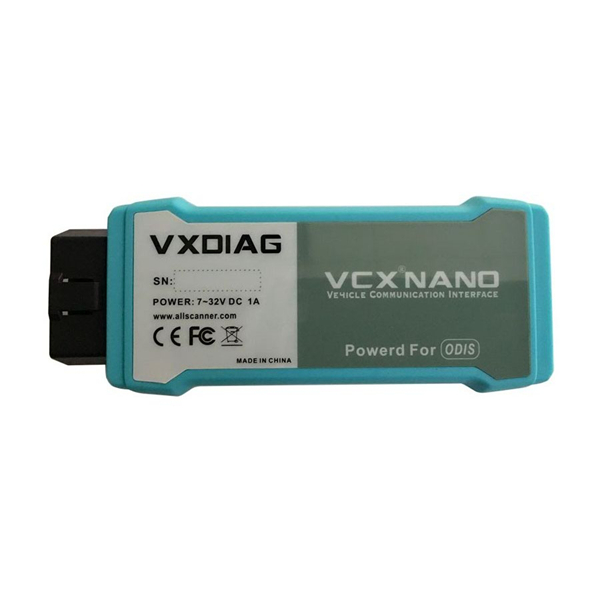

Software version: ODIS V3.0.3
Top feature:
1. Replacement of OEM VAS 5054A
2. Support UDS Protocol
3.Multi-languages: English/Japanese/Portuguese/Romanian/Korean/Dutch/Polish/Turkish/Spanish/ French/Italian/Croatian/Danish/German/Swedish/Finnish/Slovenian/Czech/Russian/Greek/Chinese
4. Supported Car Models: VW, AUDI, SKODA, SEAT Bentley and Lamborghini
5. Update from download weblink
6. Support WIFI/USB Connection
VXDIAG VCX NANO 5054 VAG Computer Requirements:
Windows System Language: American English
Operating system: WIN 7 32 bits/WIN 7 64 bits
System C: // have to be NTFS format
C: // need to have at least 40GB space for installing ODIS
The Following Vehicle Bus Systems are supported:
K line (ISO9141-2)
High-speed CAN (ISO 11898-2)
Low-speed CAN (ISO 11898-3)
J1850 (SAE J1850)
UDS Protocol
PWM Protocol


7/26/2016
VXDIAG VCX NANO GM "Manager Initialization Error"
Here is the solution to VXDIAG VCX NANO for GM/Opel GM MDI Manager Initialization Error.
Problem:
It worked yesterday with Saab 9-5 2006 (9.250 bin, with problems but it can read trouble codes and make some config).
Today I want to make a clean installation on VMware with Windows XP image.
After installation I can not run GM MDI Manager.
1. If I choose UNINSTALL in "MDI Select" I can open MDI Manager and manager can not find any interface. (drivers installed properly)
I have only "Not connected to MDI".
2. If I choose INSTALL - I have an error.
"Manager Initialization Error [Failed to initialize Vetronix Runtime rc = -5]"
Also I don`t have any table with interface option to choose at the start of Tech2Win.
(because MDI Manager didn`t find pluged any interface?)
I can find VCX Nano and configure with VX Manager.

Solution:
If your running in VM make sure your OS didn't connect to it via wifi etc. You want your VM to set up the drivers not the primary OS. If it did just disconnect in primary OS on network and try again in VM.
Please refer to the following:
Tech2Win Install(WIN XP or WIN 7)
--------------------
1. Run Tech2Win\AutoInstall.exe, Everything will be done.
2. install VX Manager.
3. Open VX Manager, install GM Driver.
Running GDS2 with VMWare
--------------------
1. Install VMware-player-6.0.6-2700073.exe
2. copy GDS2 VM to harddisk.
3. open GDS2 VM with VMware Player
Video instruction:
How to install VXDIAG VCX NANO GM GDS2
7/18/2016
VXDIAG VCX NANO for Ford and GM Feedback
Like some of you I was interested in some Allscanner products, so I went ahead and purchased 2 pieces of VXDIAG VCX NANO scanners.
-VXDIAG VCX nano for Ford & Mazda ($99)
-VXDIAG VCX nano for GM ($119)
Both without WiFi, i do not need wifi connection.
It's been over a month now that I have both adapters and had time to play around a bit with them and I must say I'm a bit more positive about the GM unit even if it's not perfect.
Now you could stop reading here or keep going and find out what's the problem with these adapters.
FIRST: PACKAGING
When I got these tools I bought from obdii365.com, I was at first impressed by the quality of the packaging. Great quality box, long USB cable (yeah I purchased the usb version). All looked very professional.


SECOND : SOFTWARE
Both tools came with software CDs including GDS2, Tech2win, Mazda IDS and Ford IDS. I was pretty happy with it, they all installed flawlessly.
-Tech2win installed on host machine is forever activated (read patched),
-GDS2 works good on the provided VM
-Mazda IDS VM works good
-BUT.... Ford VM need the host machine to be in Bejing time zone in order to work.... that's a bit frustrating to me as I need to change my time zone in host machine everytime I want to use Ford IDS VM... even more, they installed a time freezing app on this one without installing the vcx nano driver so EVERYTIME you boot this VM , you need to install the vcx nano driver in order to use it... This is the downside.
still 3 out of 4 software running great, I was pleased.
THIRD: VEHICLE DIAGNOSTIC (what really matter)
Then I decided to push a little more and I tried reprogramming a 2006 chevy trailblazer using tis2000. All went well.
Then I went back to the 2004 Chevy cavalier and also tried to replace and reprogram the PCM with tis2000. Failed to attempt. GM Tech2 clone does this well.
Since then, I played a bit with tech2win software (since I don't have many 2013+ GM car on hand to try GDS2) and I must admit 80% of what I tried worked. This leave me a 20% of fail attempt. If you use the tool to play with your personal car that may be fine.
Ford & Mazda IDS
First attempt, connect to a 2005 Ford Five Hundred : good, the car is recognized
Record and play back live data for ABS, PCM…tested ok
Program and Install new ECUs (PCM, ABS)…tested ok
Read and Clear DTCs…tested ok
Program New Keys for Mazda 6…tested ok
Set, adjust or remove speed governors…tested ok
DPF Regeneration…tested ok
Automatic vehicle recognition…tested ok
All other dealer functions…tested ok
Reset steering angle…tested ok
Find guided fault…tested ok
Injector Coding…tested ok
-VXDIAG VCX nano for Ford & Mazda ($99)
-VXDIAG VCX nano for GM ($119)
Both without WiFi, i do not need wifi connection.
It's been over a month now that I have both adapters and had time to play around a bit with them and I must say I'm a bit more positive about the GM unit even if it's not perfect.
Now you could stop reading here or keep going and find out what's the problem with these adapters.
FIRST: PACKAGING
When I got these tools I bought from obdii365.com, I was at first impressed by the quality of the packaging. Great quality box, long USB cable (yeah I purchased the usb version). All looked very professional.


SECOND : SOFTWARE
Both tools came with software CDs including GDS2, Tech2win, Mazda IDS and Ford IDS. I was pretty happy with it, they all installed flawlessly.
-Tech2win installed on host machine is forever activated (read patched),
-GDS2 works good on the provided VM
-Mazda IDS VM works good
-BUT.... Ford VM need the host machine to be in Bejing time zone in order to work.... that's a bit frustrating to me as I need to change my time zone in host machine everytime I want to use Ford IDS VM... even more, they installed a time freezing app on this one without installing the vcx nano driver so EVERYTIME you boot this VM , you need to install the vcx nano driver in order to use it... This is the downside.
still 3 out of 4 software running great, I was pleased.
THIRD: VEHICLE DIAGNOSTIC (what really matter)
Tech2WIN & GDS2
The first vehicle I hooked up was a 2004 Chevy cavalier running tech2win. The car was recognized by the software and I was able to read codes, live data, activate special functions. First good impression.
The first vehicle I hooked up was a 2004 Chevy cavalier running tech2win. The car was recognized by the software and I was able to read codes, live data, activate special functions. First good impression.
Then I decided to push a little more and I tried reprogramming a 2006 chevy trailblazer using tis2000. All went well.
Then I went back to the 2004 Chevy cavalier and also tried to replace and reprogram the PCM with tis2000. Failed to attempt. GM Tech2 clone does this well.
Since then, I played a bit with tech2win software (since I don't have many 2013+ GM car on hand to try GDS2) and I must admit 80% of what I tried worked. This leave me a 20% of fail attempt. If you use the tool to play with your personal car that may be fine.
Ford & Mazda IDS
First attempt, connect to a 2005 Ford Five Hundred : good, the car is recognized
Record and play back live data for ABS, PCM…tested ok
Program and Install new ECUs (PCM, ABS)…tested ok
Read and Clear DTCs…tested ok
Program New Keys for Mazda 6…tested ok
Set, adjust or remove speed governors…tested ok
DPF Regeneration…tested ok
Automatic vehicle recognition…tested ok
All other dealer functions…tested ok
Reset steering angle…tested ok
Find guided fault…tested ok
Injector Coding…tested ok
CONCLUSION:
VXDIAG VCX NANO GM:
If you want to play around with your personal car, it is very good.
If you need it professionally, i prefer GM Tech II and GM MDI.
FORD & MAZDA VCX NANO :
If you need to read codes and live data, very cheap and good choice.
If you need do programming, VCM2 works more for me.
VXDIAG VCX NANO GM:
If you want to play around with your personal car, it is very good.
If you need it professionally, i prefer GM Tech II and GM MDI.
FORD & MAZDA VCX NANO :
If you need to read codes and live data, very cheap and good choice.
If you need do programming, VCM2 works more for me.
6/12/2016
Free download SDD V145 Offline for VXDIAG VCX NANO for JLR
VXDIAG VCX NANO for Jaguar and Land Rover 2 in 1 SDD diagnostic software update to V145 engineering software support offline programming.

Free download VXDIAG JLR SDD V145 Offline Engineering software
Software version: SDD V145
Multi language:English/Japanese/Portuguese/Romanian/Korean/Dutch/Polish/Turkish/Spanish/French/Italian/Croatian/Danish/German/Swedish/Finnish/Slovenian/Czech/Russian/Greek/Chinese
Supported Car Models: Diesel and gasoline cars
Update by CD, without firmware locked
Computer requirement:
Windows 7 32-bit opearating system
Processor I3 I5
RAM at least 1G
Hard drive over 200G (SSD is better)
VXDIAG VCX NANO for JLR Vehicle List:
Support 2005 to 2014 year vehicles of Jaguar and Land Rover
Support L316, L319, L320, L322, L359, L405,L494, L550, L538 Land Rover Vehicle Lines
Support X100, X150, X152, X202, X250, X350, X351, X400 Jaguar Vehicle Lines
Jaguar-Land Rover JLR SDD Features:
1. Data Lists
2. Active Tests
3. Monitor
4. Utility tests
5. Reprogramming
6. Diagnostics Trouble Codes
Subscribe to:
Posts (Atom)